Resumo IPv6 – CCNA e CCNPAbstract IPv6 – CCNA and CCNP

Olá Pessoal,

Fiz este resumo sobre pontos mais importantes do IPv6 para ser didático, compreensível e objetivo. O nível de abrangência deste resumo ficaria num ponto intermediário entre as certificações CCNA e BSCI. Segue abaixo.

IPv6

– Foi adicionado diversas funcionalidades se comparado com o IPv4, tais como: 128 bits para endereçamento (IPv4 apenas 32), segurança (através de extension headers), técnicas para transição de IPv4 para IPv6, QOS embebbed (direto no  header), autoconfiguration (permite um host obter um endereço IP sem ter que rodar um DHCP na rede) e mobilidade IP.

– O endereço IPv6 possui 128 bits e é dividido em 8 ‘sextetos’, cada um com 16 bits.

– O Header (incluindo IPs de origem e destino) possui 320 bits, sem as extensões – apresentado abaixo.

Header IPv6

– IPv6 não possui o campo checksum (e nem o realiza) por considerar que o controle de erros das camadas inferiores é confiável.

– IPv6 não usa broadcast, e sim multicast. Um broadcast poderia ser simulado enviando um multicast para o endereço All-nodes, escopo Link-local (FF02::1).

– Endereço de Loopback – ::1/128 (IPv4 = 127.0.0.1). Endereço default-route – ::0/0 (IPv4 = 0.0.0.0/0).

– EUI-64: formato derivado do MAC-address utilizado para se atribuir endereços Link-Local. É pego o MAC address (48 bits), inserido o número hexadecimal FFFE no meio dele e modificado os primeiros 2 bits (de 00 para 20), portanto o MAC 00eb.1234.3322 no formato EUI-64 ficaria: 02eb:12ff:fe34:3322. Enfim, agregando o prefixo para endereços Link-local teríamos: FE80::02eb:12ff:fe34:3322.

– Tipos de endereços IPv6:

  • Global Unicast: Identifica um host único na Internet. Serão atribuidos prefixos para cada organização (48 bits ou menos), como visto na figura. A IANA definiu o prefixo para estes prefixos como 2000::/3.Prefixo Global Unicast
  • Link-Local: Cada interface recebe um destes endereços. É utilizado para os dispositivos na mesma rede se comunicarem sem ter de utilizar o endereço Global Unicast. Utilizam o Prefixo FE80::/10 + o formato EUI-64.
  • Site-local. Endereço único dentro do escopo da organização, não roteável na Internet. Prefixo: FEC0::/10.

– Multicast: Identificado pelo prefixo FF00::/8. Os próximos 4 bits são flags, e os outros 4 próximos definem o escopo do Multicast (apresentados abaixo). Ao lado, é apresentado um esquema da abrangência dos escopos.

IPv6 - Escopo Multicast

  • 1 = Interface-local.
  • 2 = Link-local.
  • 5 = Site-local.
  • 8 = Organization-local.
  • E = Global.

– Anycast: Um endereço Global Unicast atribuido a mais de um dispositivo, definido-o como anycast. Tem como função rotear para o dispositivo anycast mais próximo. Veja abaixo.

Endereço Anycast demonstrado

– Hosts Ipv6 devem responder pelo menos nos seguintes endereços:

  • Global Unicast e Anycast (2000::/3)
  • Link-local (FE80::/10, por autoconfiguration
  • Loopback (::1/128)
  • All-nodes Multicast (FF01::1 e FF02::1)
  • Outro grupo multicast atribuido.

– Roteadores, além de responder neste endereços devem ainda responder em:

  • Endereço Anycast da subrede (endereço da subrede com o Interface ID – endereço do host – setado em 0)
  • All-routers Multicast (FF01::2, FF02::2, FF05::2)
  • Grupos de multicast definidos por protocolos de roteamento (se aplicável). EIGRP for IPv6: FF02::10, OSPFv3: FF02::5 (todos Routers) e FF02::6 (apenas DR e BDR).

– As principais formas de transição do IPv4 para IPv6 pode ser feita através do Dual Stack (rodar ambos IPv4 e IPv6 até não ter mais necessidade de IPv4) e Tunelamento (encapsular o pacote IPv6 dentro de um pacote IPv4 – figura). Para o tunelamento é previsto o prefixo 2002::/16.
Tunelamento IPv6

Referências

CCNP BSCI Official Exam Certification Guide 4th edition, por Brent Stewart. CiscoPress

CCNA 4.1 Guia Completo de Estudo, por Marco Filippetti. Visual Books

CertProject, imagem do header IPv6.

– Cisco IOS IPv6 Multicast Introduction – MT BOM.

– RFC 3513 Internet Protocol Version 6 (IPv6) Addressing.

Gostaria de dedicar apoio especial a todos que estarão se certificando ao longo do mês de junho.

Um grande abraço,

Maurício Bento Ghem.Hello Guys,
I did this summary on the most important of IPv6 to be didactic, comprehensive and objective. The level of coverage of this summary would be midway between BSCI and CCNA certifications. Below.

IPv6

– We added several features compared to IPv4, such as 128 bits for addressing (IPv4 only 32), security (through extension headers), techniques to transition from IPv4 to IPv6, QOS embebbed (direct the header), Autoconfiguration ( allows a host to obtain an IP address without having to run DHCP on the network) and IP mobility.
– The IPv6 address has 128 bits and is divided into 8 ‘sextet’, each with 16 bits.
– The Header (including the source and destination IP) has 320 bits, without the extensions – below.
Header IPv6

– IPv6 does not have the checksum field (and not the place), considering that the control of errors of lower layers is reliable.
– IPv6 USA not broadcast, but multicasting. A broadcast can be simulated by sending a multicast address to the All-nodes, link-local scope (FF02:: 1).
– Loopback Address -:: 1 / 128 (IPv4 = 127.0.0.1). Address default-route -: 0 / 0 (IPv4 = 0.0.0.0 / 0).
– EUI-64: format derived from the MAC-address used to assign addresses Link-Local. You get the MAC address (48 bits), the hexadecimal number FFFE inserted in the middle of it and changed the first 2 bits (from 00 to 20), so the MAC 00eb.1234.3322 in EUI-64 format would be: 02eb: 12ff: fe34: 3322. Finally, adding the prefix for link-local addresses would: FE80:: 02eb: 12ff: fe34: 3322.
– Types of IPv6 addresses:

  • Global Unicast: Identifies a single host on the Internet. Prefixes will be assigned to each organization (48 bits or less), as seen in the picture. The IANA defines the prefix for these prefixes like 2000:: / 3.Prefixo Global Unicast
  • Link-Local: Each interface receives one of these addresses. It is used for the devices on the same network to communicate without having to use the Global Unicast address. Use the prefix FE80:: / 10 + the EUI-64 format.
  • Site-local. Single address within the scope of the organization, not routable on the Internet. Prefix: FEC0:: / 10.

– Multicast: Identified by prefix FF00:: / 8. The next 4 bits are flags, and the other 4 next define the scope of Multicast (shown below). Beside, a diagram of the range of scopes.
IPv6 - Escopo Multicast

  • 1 = Interface-local.
  • 2 = link-local.
  • 5 = site-local.
  • 8 = Organization-local.
  • E = Global.

– Anycast: A Global Unicast address assigned to more than one device, set it as anycast. Has as its route to the nearest anycast device. See below.
Endereço Anycast demonstrado

– IPv6 Hosts must meet at least the following addresses:

  • Global Unicast and Anycast (2000:: / 3)
  • Link-local (FE80:: / 10, by Autoconfiguration
  • Loopback (:: 1 / 128)
  • Multicast all-nodes (FF01:: 1 and FF02:: 1)
  • Another group multicast assigned.

– Routers, and this answer should also respond in address:

  • Anycast address of the subnet (the subnet address with the Interface ID – Host address – set to 0)
  • All-Multicast routers (FF01:: 2, FF02:: 2, FF05:: 2)
  • Groups defined by multicast routing protocols (if applicable). EIGRP for IPv6: FF02:: 10, OSPFv3: FF02:: 5 (all routers) and FF02:: 6 (only DR and BDR).

– The main forms of transition from IPv4 to IPv6 can be made through the Dual Stack (running both IPv4 and IPv6 to no longer have need for IPv4) and tunneling (encapsulate the IPv6 packet within an IPv4 packet – figure). For the tunneling is expected the prefix 2002:: / 16.Tunelamento IPv6

References:

CCNP BSCI Official Exam Certification Guide 4th edition, por Brent Stewart. CiscoPress

CCNA 4.1 Guia Completo de Estudo, por Marco Filippetti. Visual Books

CertProject, imagem do header IPv6.

Cisco IOS IPv6 Multicast Introduction – Very good.

RFC 3513 Internet Protocol Version 6 (IPv6) Addressing.

I would pay special support to all who will make sure during the month of June.

A big hug,

Maurício Bento Ghem.

Laboratório IPv6 6-to-4 TunnelingLab IPv6 6-to-4 Tunneling

Olá Pessoal,

Mais um laboratório interessantíssimo a nível de CCNP. Este laboratório é bastante simples, mas ilustra da melhor maneira um problema que todos nós Network Engineers teremos de enfrentar no futuro.

Como a Internet roda IPv4 será um grande desafio migrá-la para se utilizar IPv6 em todos seus pontos. Este laboratório é ilustrado o tunelamento GRE entre duas localidades utilizando como meio a Internet (R2 simulando uma rede IPv4).

Abaixo é apresentado a topologia da rede.

Laboratorio IPv6 - 6-to-4 Tunneling

A IOS utilizada é a c7200-advipservicesk9-mz.124-9.T.bin disponível no HD do blog. Seguem as mesmas recomendações para os laboratórios: usem e abusem de comandos show e debug, modifiquem o laboratório e o utilizem para estudar e APRENDER.

Abaixo, é apresentado o link para download.

Laboratório IPv6 – 6-to-4 Tunneling (atualizado)

Um forte abraço,

Maurício Bentow.Hello Guys,

More interesting to a laboratory level of CCNP. This laboratory is quite simple, but illustrates the way a problem we all Network Engineers will have to face in the future.

As the wheel IPv4 Internet will be a great challenge migrate it to use IPv6 in all its points. This laboratory is illustrated the GRE tunneling between two locations using the Internet as a means (R2 simulating an IPv4 network).

Below is the topology of the network.

Laboratorio IPv6 - 6-to-4 Tunneling

The IOS is used advipservicesk9-c7200-mz.124-9.T.bin available in HD blog. Follow the same recommendations for the laboratory: use and abuse of show commands and debug, modify and use the laboratory to study and learn .

Below is presented a link to download.

Lab IPv6 – 6-to-4 Tunneling (updated)

Sinceraly,

Maurício Bentow.

Resumo Protocolos de Roteamento – BSCISummary of Routing Protocols – BSCI

Olá pessoal,

Estando na fase final de preparação para a BSCI fiz um resumo mais sucinto dos protocolos de roteamento que fazem parte do escopo desta prova. Este resumo visa diferenciar diversos detalhes que são cobrados na BSCI, tais como: métrica padrão quando uma rota é redistribuida, terminologia e muitos outros aspectos. Os protocolos de roteamento cobrado no exame são:

– EIGRP

OSPF multiarea

Integrated IS-IS

BGP in a non-Transit AS.

Foi criada uma tabela no excel que foi convertida para uma figura. Esta é apresentada um pouco menor abaixo. Clique na figura para obtê-la na íntegra.

EIGRP - OSPF - ISIS - BGP. Resumo

Um abração pessoal,

Maurício.Hello everybody,

In the final stage of preparation for BSCI did a more succinct summary of the routing protocols that are part of the scope of this evidence. This summary aims to differentiate various details that are charged in BSCI, such as standard metric when a route is redistributed, terminology and much more. The routing protocols charged in the examination are:

EIGRP

– OSPF multiarea

– Integrated IS-IS

– BGP in a non-transit AS.

It created a table in Excel which was converted to a figure. This appears a little lower down. Click the picture to download it in full.

EIGRP - OSPF - ISIS - BGP. Resumo

Cheers,

Maurício.

Laboratório EIGRP – Pratica de Queries e DHCP-relay EIGRP Lab – Practice of Queries and DHCP-relay

Olá Pessoal,

Este laboratório engloba diversas áreas de conhecimento de roteamento. A configuração base é apresentada na figura abaixo.

Topologia do Laboratório EIGRP - Queries e DHCP-relay

Neste lab o roteador R2 atua como servidor DHCP para sua própria rede para rede de R3 que utiliza o comando ip helper-address para utilizar o pool configurado em R2.

O objetivo deste lab, além de entender a configuração DHCP é poder derrubar links e observar a topology table para ver as rotas passando para o estado ativo, ou seja, buscando um caminho alternativo para a rota que caiu.

Note que como no Dynamips não é possível adicionar Hosts, foram adicionados roteadores só que sem a função de roteamento. Isto foi possível por meio do comando no ip routing.

No mais, sigam as recomendações de sempre: comandos show e debug e personalizar os labs para entender e aprender. Foi utilizado roteadores 3600 e a IOS está disponível no HD do blog. Não esqueçam de modificar os caminhos no arquivo .net.

Segue abaixo o link para download.

Laboratório EIGRP – Prática de Queries e Dhcp-Relay

Um abração pessoal,

Maurício.


Hello Guys,

This laboratory includes several areas of knowledge of routing. The basic configuration is shown in figure below.

Topologia do Laboratório EIGRP - Queries e DHCP-relay

In this lab the R2 router acts as DHCP server for your own network to network R3 using the command ip helper-address to use the pool set in R2.

The objective of this lab, and understand the DHCP configuration is able to observe the drop links and topology table to see the routes going to the active state, or seeking an alternate path for the route that fell.

Note that as in Dynamips is not possible to add hosts, routers only have added that without the function of routing. This was possible through the command ip routing.

In addition, follow the recommendations of all: show and debug commands and customize the labs to understand and learn. We used 3600 routers and IOS is available in HD blog. Do not forget to change the paths in the file. Net.

Here is the link to download.

EIGRP Lab – Practice and Queries Dhcp-Relay

A Abrasive staff,

Maurício.

Laboratório BGP – Comunicação entre IBGP peersBGP Lab – Communication between IBGP peers

Olá Pessoal,


Uma parte bastante complexa do protocolo BGP é a comunicação dentro do sistema autônomo, ou seja, quando ele roda como IBGP (interior). Diversas regras do BGP se alteram quando a comunicação e troca de rotas ocorrem dentro do sistema autônomo, sendo que a topologia deve ser bem planejada para configurar os roteadores da maneira adequada.

Este laboratório é focado na comunicação IBGP, e para o tornar mais interessante, os routers não estão na disposição full-meshed. Deve-se ter em mente que as rotas aprendidas pelo IBGP não são anunciadas para outros IBGP peers, por isso a disposição full-mesh é muito utilizada. Quando não é possível é introduzido um route-reflector.

Um route-reflector nada mais é que um roteador que replica sua tabela BGP para seus peers configurados.

Segue abaixo a topologia.

Topologia - Laboratorio Bgp - IBGP peers

As recomendações padrão: usar e abusar de comandos show e debug, entender o funcionamento e trocas de rotas e APRENDER com o laboratório. Foram utilizadas as IOS c3620-is-mz.123-15 e c7200-ik9o3s-mz.123-22 ambas disponíveis no HD do blog. Os arquivos TXT incluídos possuem as configurações inicias do laboratório sendo que o laboratório (.NET) já possui as configurações finais com tudo funcionando. Segue abaixo o link para download.

Laboratório BGP – IBGP Peers


Um forte abraço para todos e boa semana.

Maurício.

PS: Para os que têm problemas com inglês entrem em contato comigo que traduzo para português. Os comentários feitos por mim estão sendo feitos em inglês devido a prática, material de estudo e prova serem tudo nesta língua, portanto, vamos se puxar galera. Outro abraço.


Hello Guys,

A very complex part of the BGP protocol is communication within the autonomous system, or when he runs as IBGP (interior). Several BGP rules change when the communication and exchange of routes occur within the autonomous system, where the topology should be well planned to set up the routers adequately.

This laboratory is focused on communication IBGP, and to make it more interesting, the routers are not available in full-meshed.It should be borne in mind that the routes learned by IBGP are not advertised to other IBGP peers, so the full provision -mesh is widely used. When you can not be made a route-reflector.

A route-reflector is nothing but a router that replicates its BGP table to its peers configured.

Below the topology.

Topologia - Laboratorio Bgp - IBGP peers

The standard recommendations: use and abuse of show and debug commands, understand the operation and trade routes and learn from the laboratory. Were used IOS c3620-is-mz.123-15 c7200-mz.123-22-ik9o3s both available in HD blog. TXT files have included the initial settings of the laboratory and the laboratory (. NET) already has end settings with everything working.Here is the link to download.

BGP Lab – IBGP Peers

A strong hug to all and good week.

Maurício.

PS: For those who have problems with English come in contact with me to translate to Portuguese. Comments made by me are being made in English because the practice, study and test materials are all in this language, so if we pull everybody. Another hug.

Resumo de comandos Show para Integrated IS-IS – BSCISummary of Show commands for Integrated IS-IS – BSCI

Olá Pessoal,


Prosseguindo a série de Comandos Show, apresento-lhes para o protocolo IS-IS.

Este protocolo é bastante diferente da maioria, pois se baseia no endereçamento OSI. Numa primeira análise parece ser complicado, mas entendendo a teoria por trás do protocolo fica tudo descomplicado.

Segue abaixo.


COMANDO RELACIONADO A RESULTADO
show clns IS-IS – Geral Apresenta resumo, contêm: número de interfaces que está rodando, NET address e timers.
show clns neighbors IS-IS – Neighbors Resumo dos vizinhos. Contêm: ID do router remoto, interface, SNPA (endereço da camada de enlace), estado, holdtime e tipo de adjacência (Level-1, Level-2).
show clns neighbors detail IS-IS – Neighbors Apresenta detalhes dos vizinhos. Além das informações anteriores apresenta ainda: IP address, uptime e área (extraído do NET).
show clns route IS-IS – Routes Apresenta todos os NSAP (Network Service Access Point) é possível rotear dados.
show isis topology [..] IS-IS – Routes Apresenta uma lista de caminhos para todos os routers dentro do domínio de roteamento. Pode-se passar parâmetros para filtrar (apenas Level-1, por exemplo.)
show isis database [..] IS-IS – LSPs Apresenta cada uma das LSPs na base de dados. Contêm informações como: router que gerou a LSP (LSPID), sequence numbers, checksum, holdtime e bits para controle. Pode-se passar parâmetros para filtrar (apenas Level-1, por exemplo.)
show isis spf-log IS-IS – SPF Apresenta informações pertinentes a execução do algoritmo SPF. Se houverem muitas execuções suspeite de problemas de configuração.


OUTPUTS:


R4#show clns
Global CLNS Information:
3 Interfaces Enabled for CLNS
NET: 49.0020.0000.0000.000b.00
Configuration Timer: 60, Default Holding Timer: 300, Packet Lifetime 64
ERPDU's requested on locally generated packets
Running IS-IS in IP-only mode (CLNS forwarding not allowed)


R4#show clns neighbors

System Id Interface SNPA State Holdtime Type Protocol
R3 Se1/0 *HDLC* Up 28 L2 IS-IS
R5 Se1/1 *HDLC* Up 25 L2 IS-IS


R4#show clns neighbors detail

System Id Interface SNPA State Holdtime Type Protocol
R3 Se1/0 *HDLC* Up 25 L2 IS-IS
Area Address(es): 49.0020
IP Address(es): 10.100.0.1*
Uptime: 00:42:23
NSF capable
R5 Se1/1 *HDLC* Up 23 L2 IS-IS
Area Address(es): 49.0030
IP Address(es): 10.100.0.6*
Uptime: 00:42:23
NSF capable


R4#show clns route
Codes: C - connected, S - static, d - DecnetIV
I - ISO-IGRP, i - IS-IS, e - ES-IS
B - BGP, b - eBGP-neighbor

C 49.0020.0000.0000.000b.00 [1/0], Local IS-IS NET
C 49.0020 [2/0], Local IS-IS Area


R3#show isis topology ?
WORD Hostname or NSAP of a router
l1 Paths to all level-1 routers in the area
l2 Paths to all level-2 routers in the domain
level-1 Paths to all level-1 routers in the area
level-2 Paths to all level-2 routers in the domain
| Output modifiers

R3#show isis topology

IS-IS paths to level-1 routers
System Id Metric Next-Hop Interface SNPA
R3 --

IS-IS paths to level-2 routers
System Id Metric Next-Hop Interface SNPA
R3 --
R4 5 R4 Se2/0 *HDLC*
R5 15 R4 Se2/0 *HDLC*


R3#show isis database ?
WORD LSPID in the form of xxxx.xxxx.xxxx.xx-xx or name.xx-xx
detail Detailed link state database information
l1 IS-IS Level-1 routing link state database
l2 IS-IS Level-2 routing link state database
level-1 IS-IS Level-1 routing link state database
level-2 IS-IS Level-2 routing link state database
verbose Verbose database information
| Output modifiers

R3#show isis database

IS-IS Level-1 Link State Database:
LSPID LSP Seq Num LSP Checksum LSP Holdtime ATT/P/OL
R3.00-00 * 0x00000005 0xB7E2 1057 1/0/0
IS-IS Level-2 Link State Database:
LSPID LSP Seq Num LSP Checksum LSP Holdtime ATT/P/OL
R3.00-00 * 0x00000006 0x4207 1005 0/0/0
R4.00-00 0x00000005 0x9CAF 942 0/0/0
R5.00-00 0x00000005 0x63ED 795 0/0/0


R3#show isis spf-log

level 1 SPF log
When Duration Nodes Count First trigger LSP Triggers
00:43:43 0 1 4 R3.00-00 PERIODIC RTCLEARED NEWMETRI
C NEWLSP
00:43:27 0 1 2 R3.00-00 ATTACHFLAG LSPHEADER
00:28:52 0 1 1 PERIODIC
00:13:52 0 1 1 PERIODIC

level 2 SPF log
When Duration Nodes Count First trigger LSP Triggers
00:43:44 0 1 4 R3.00-00 PERIODIC RTCLEARED NEWMETRI
C NEWLSP
00:43:34 8 3 4 R3.00-00 NEWADJ LSPHEADER TLVCONTENT
00:28:54 4 3 1 PERIODIC
00:13:53 4 3 1 PERIODIC


Um abração,

Maurício Bento Ghem.Hello Guys,

Continuing the series of commands Show, presenting them to the IS-IS protocol.

This protocol is quite different from most because it is based on the OSI address. At first sight appears to be complicated, but understanding the theory behind the protocol is all uncomplicated.

Below.

COMMAND A RELATED RESULT
show clns IS-IS – General Displays summary, include: number of interfaces that are running, NET timers and address.
show clns neighbors IS-IS – Neighbors Overview of neighbors. Include: remote router ID, interface, SNPA (link-layer address), status, and type of adjacency holdtime (Level-1, Level-2).
show clns neighbors detail IS-IS – Neighbors Presents details of the neighbors. Besides the above information still shows: IP address, uptime and area (from the NET).
show clns route IS-IS – Routes Displays all NSAP (Network Service Access Point) you can route data.
show isis topology [..] IS-IS – Routes Displays a list of paths to all routers within the area of routing. You can pass parameters to filter (only Level-1, for example.)
show isis database [..] IS-IS – LSPs Displays each of the LSPs in the database. Contain information such as router that generated the LSP (LSPID), sequence numbers, checksum, holdtime and bits for control. You can pass parameters to filter (only Level-1, for example.)
show isis spf-log IS-IS – SPF Presents relevant information to the application of SPF algorithm. If there are many executions of suspected problems with configuration.

OUTPUTS:

R4#show clns
Global CLNS Information:
3 Interfaces Enabled for CLNS
NET: 49.0020.0000.0000.000b.00
Configuration Timer: 60, Default Holding Timer: 300, Packet Lifetime 64
ERPDU's requested on locally generated packets
Running IS-IS in IP-only mode (CLNS forwarding not allowed)

R4#show clns neighbors

System Id Interface SNPA State Holdtime Type Protocol
R3 Se1/0 *HDLC* Up 28 L2 IS-IS
R5 Se1/1 *HDLC* Up 25 L2 IS-IS

R4#show clns neighbors detail

System Id Interface SNPA State Holdtime Type Protocol
R3 Se1/0 *HDLC* Up 25 L2 IS-IS
Area Address(es): 49.0020
IP Address(es): 10.100.0.1*
Uptime: 00:42:23
NSF capable
R5 Se1/1 *HDLC* Up 23 L2 IS-IS
Area Address(es): 49.0030
IP Address(es): 10.100.0.6*
Uptime: 00:42:23
NSF capable

R4#show clns route
Codes: C - connected, S - static, d - DecnetIV
I - ISO-IGRP, i - IS-IS, e - ES-IS
B - BGP, b - eBGP-neighbor

C 49.0020.0000.0000.000b.00 [1/0], Local IS-IS NET
C 49.0020 [2/0], Local IS-IS Area

R3#show isis topology ?
WORD Hostname or NSAP of a router
l1 Paths to all level-1 routers in the area
l2 Paths to all level-2 routers in the domain
level-1 Paths to all level-1 routers in the area
level-2 Paths to all level-2 routers in the domain
| Output modifiers

R3#show isis topology

IS-IS paths to level-1 routers
System Id Metric Next-Hop Interface SNPA
R3 --

IS-IS paths to level-2 routers
System Id Metric Next-Hop Interface SNPA
R3 —
R4 5 R4 SE2 / 0 * HDLC *
R5 15 R4 SE2 / 0 * HDLC *

R3#show isis database ?
WORD LSPID in the form of xxxx.xxxx.xxxx.xx-xx or name.xx-xx
detail Detailed link state database information
l1 IS-IS Level-1 routing link state database
l2 IS-IS Level-2 routing link state database
level-1 IS-IS Level-1 routing link state database
level-2 IS-IS Level-2 routing link state database
verbose Verbose database information
| Output modifiers

R3#show isis database

IS-IS Level-1 Link State Database:
LSPID LSP Seq Num LSP Checksum LSP Holdtime ATT/P/OL
R3.00-00 * 0x00000005 0xB7E2 1057 1/0/0
IS-IS Level-2 Link State Database:
LSPID LSP Seq Num LSP Checksum LSP Holdtime ATT/P/OL
R3.00-00 * 0x00000006 0x4207 1005 0/0/0
R4.00-00 0x00000005 0x9CAF 942 0/0/0
R5.00-00 0x00000005 0x63ED 795 0/0/0
1/0/0 IS-IS Level-1 Link State Database:
LSPID LSP Seq Num LSP Checksum LSP Holdtime ATT/P/OL
R3.00-00 * 0x00000005 0xB7E2 1057 1/0/0
IS-IS Level-2 Link State Database:
LSPID LSP Seq Num LSP Checksum LSP Holdtime ATT/P/OL
R3.00-00 * 0x00000006 0x4207 1005 0/0/0
R4.00-00 0x00000005 0x9CAF 942 0/0/0
R5.00-00 0x00000005 0x63ED 795 0/0/0
0/0/0 IS-IS Level-1 Link State Database:
LSPID LSP Seq Num LSP Checksum LSP Holdtime ATT/P/OL
R3.00-00 * 0x00000005 0xB7E2 1057 1/0/0
IS-IS Level-2 Link State Database:
LSPID LSP Seq Num LSP Checksum LSP Holdtime ATT/P/OL
R3.00-00 * 0x00000006 0x4207 1005 0/0/0
R4.00-00 0x00000005 0x9CAF 942 0/0/0
R5.00-00 0x00000005 0x63ED 795 0/0/0
0/0/0 IS-IS Level-1 Link State Database:
LSPID LSP Seq Num LSP Checksum LSP Holdtime ATT/P/OL
R3.00-00 * 0x00000005 0xB7E2 1057 1/0/0
IS-IS Level-2 Link State Database:
LSPID LSP Seq Num LSP Checksum LSP Holdtime ATT/P/OL
R3.00-00 * 0x00000006 0x4207 1005 0/0/0
R4.00-00 0x00000005 0x9CAF 942 0/0/0
R5.00-00 0x00000005 0x63ED 795 0/0/0
0/0/0 IS-IS Level-1 Link State Database:
LSPID LSP Seq Num LSP Checksum LSP Holdtime ATT/P/OL
R3.00-00 * 0x00000005 0xB7E2 1057 1/0/0
IS-IS Level-2 Link State Database:
LSPID LSP Seq Num LSP Checksum LSP Holdtime ATT/P/OL
R3.00-00 * 0x00000006 0x4207 1005 0/0/0
R4.00-00 0x00000005 0x9CAF 942 0/0/0
R5.00-00 0x00000005 0x63ED 795 0/0/0

R3#show isis spf-log

level 1 SPF log
When Duration Nodes Count First trigger LSP Triggers
00:43:43 0 1 4 R3.00-00 PERIODIC RTCLEARED NEWMETRI
C NEWLSP
00:43:27 0 1 2 R3.00-00 ATTACHFLAG LSPHEADER
00:28:52 0 1 1 PERIODIC
00:13:52 0 1 1 PERIODIC

level 2 SPF log
When Duration Nodes Count First trigger LSP Triggers
00:43:44 0 1 4 R3.00-00 PERIODIC RTCLEARED NEWMETRI
C NEWLSP
00:43:34 8 3 4 R3.00-00 NEWADJ LSPHEADER TLVCONTENT
00:28:54 4 3 1 PERIODIC
00:13:53 4 3 1 PERIODIC

A Abrasive,

Maurício Bento Ghem.

Resumo de Comandos Show para OSPF – BSCISummary of Show Commands for OSPF – BSCI

Olá Pessoal,

Mais um resumo da série de comandos show, agora para o protocolo OSPF com foco na prova BSCI.

Este resumo foi feito baseado no lab publicado anteriormente: Laboratório OSPF e IS-IS com Redistribution bidirecional.

Segue abaixo um resumo de cada comando. Cada um deles possui um link para sua saída completa.

COMANDO RELACIONADO A RESULTADO
Show ip ospf [process-id] OSPF – Geral Apresenta detalhes de configuração OSPF. Apresenta informações como: Router ID, timers, última execução do algoritmo SPF e estatísticas.
show ip ospf database [..] OSPF – LSAs Apresenta informações de cada tipo de LSA. Passando o parâmetro do tipo são apresentadas mais informações detalhadas sobre cada uma.
show ip ospf border-routers OSPF – ABR/ASBR Apresenta os ABR e ASBR. Detalhes como: RouterID, interface conectada e área aparecem neste comando.
show ip ospf neighbor [detail] OSPF – Neighbors Apresenta um resumo e status da adjacência com os vizinhos. Este comando apresenta informações como: ID do router vizinho, estado (DR,BDR..), dead time (tempo até a rota se extinguir, ou receber um novo hello), endereço IP do vizinho e interface local do Router no qual se encontra este vizinho.
show ip ospf interface brief OSPF – Resumo Apresenta um resumo do OSPF em cada interface na qual está rodando. Mostra: interface, process ID, área, IP e máscara, custo, estado (DR/BDR…).
show ip ospf virtual-links OSPF – Virtual-Links Apresenta (quando aplicável) os virtual-links e suas estatísticas. Informações contidas: Timers, Router ID, transit Area, estado da adjacência.
show ip route OSPF – Routes Para ilustrar o roteador que está redistribuindo as rotas, é apresentado o comando show ip route que apresenta ambas rotas do protocolo OSPF e IS-IS (e a rota default aprendida pelo IS-IS).

Outputs

R3#show ip ospf ?
<1-65535> Process ID number
border-routers Border and Boundary Router Information
database Database summary
flood-list Link state flood list
interface Interface information
mpls MPLS related information
neighbor Neighbor list
request-list Link state request list
retransmission-list Link state retransmission list
sham-links Sham link information
summary-address Summary-address redistribution Information
virtual-links Virtual link information
| Output modifiers

R3#show ip ospf 1
Routing Process "ospf 1" with ID 10.100.0.1
Supports only single TOS(TOS0) routes
Supports opaque LSA
Supports Link-local Signaling (LLS)
It is an autonomous system boundary router
Redistributing External Routes from,
isis with metric mapped to 120, includes subnets in redistribution
Initial SPF schedule delay 5000 msecs
Minimum hold time between two consecutive SPFs 10000 msecs
Maximum wait time between two consecutive SPFs 10000 msecs
Minimum LSA interval 5 secs. Minimum LSA arrival 1 secs
LSA group pacing timer 240 secs
Interface flood pacing timer 33 msecs
Retransmission pacing timer 66 msecs
Number of external LSA 0. Checksum Sum 0x000000
Number of opaque AS LSA 0. Checksum Sum 0x000000
Number of DCbitless external and opaque AS LSA 0
Number of DoNotAge external and opaque AS LSA 0
Number of areas in this router is 1. 0 normal 0 stub 1 nssa
External flood list length 0
Area 3
Number of interfaces in this area is 1
It is a NSSA area
generates NSSA default route with cost 1
Area has no authentication
SPF algorithm last executed 00:36:04.468 ago
SPF algorithm executed 4 times
Area ranges are
10.3.0.0/16 Passive Advertise
Number of LSA 8. Checksum Sum 0x041817
Number of opaque link LSA 0. Checksum Sum 0x000000
Number of DCbitless LSA 0
Number of indication LSA 0
Number of DoNotAge LSA 0
Flood list length 0

R3#show ip ospf database ?
adv-router Advertising Router link states
asbr-summary ASBR summary link states
database-summary Summary of database
external External link states
network Network link states
nssa-external NSSA External link states
opaque-area Opaque Area link states
opaque-as Opaque AS link states
opaque-link Opaque Link-Local link states
router Router link states
self-originate Self-originated link states
summary Network summary link states
| Output modifiers

R3#show ip ospf database

OSPF Router with ID (10.100.0.1) (Process ID 1)

Router Link States (Area 3)

Link ID ADV Router Age Seq# Checksum Link count
10.100.0.1 10.100.0.1 220 0x80000003 0x00E547 1
10.255.0.0 10.255.0.0 225 0x80000003 0x00C235 1

Net Link States (Area 3)

Link ID ADV Router Age Seq# Checksum
10.3.0.1 10.255.0.0 225 0x80000002 0x009D07

Summary Net Link States (Area 3)

Link ID ADV Router Age Seq# Checksum
10.0.0.0 10.255.0.0 225 0x80000002 0x005AC6
10.1.0.0 10.255.0.0 225 0x80000002 0x0058C6
10.2.0.0 10.255.0.0 225 0x80000002 0x0056C6

Type-7 AS External Link States (Area 3)

Link ID ADV Router Age Seq# Checksum Tag
0.0.0.0 10.100.0.1 220 0x80000002 0x001C2B 0
10.100.0.0 10.100.0.1 223 0x80000002 0x00AD17 0

R0#show ip ospf border-routers

OSPF Process 1 internal Routing Table

Codes: i - Intra-area route, I - Inter-area route

i 10.255.2.2 [2] via 10.0.0.2, FastEthernet0/0, ABR, Area 0, SPF 8
i 10.100.0.1 [1] via 10.3.0.2, FastEthernet1/0, ASBR, Area 3, SPF 6
i 10.255.1.1 [1] via 10.0.0.2, FastEthernet0/0, ABR, Area 0, SPF 8

R0#show ip ospf neighbor

Neighbor ID Pri State Dead Time Address Interface
10.255.1.1 1 FULL/DR 00:00:37 10.0.0.2 FastEthernet0/0
10.100.0.1 1 FULL/BDR 00:00:39 10.3.0.2 FastEthernet1/0

R3#show ip ospf interface
FastEthernet1/0 is up, line protocol is up
Internet Address 10.3.0.2/30, Area 3
Process ID 1, Router ID 10.100.0.1, Network Type BROADCAST, Cost: 1
Transmit Delay is 1 sec, State BDR, Priority 1
Designated Router (ID) 10.255.0.0, Interface address 10.3.0.1
Backup Designated router (ID) 10.100.0.1, Interface address 10.3.0.2
Timer intervals configured, Hello 10, Dead 40, Wait 40, Retransmit 5
oob-resync timeout 40
Hello due in 00:00:05
Index 1/1, flood queue length 0
Next 0x0(0)/0x0(0)
Last flood scan length is 2, maximum is 2
Last flood scan time is 0 msec, maximum is 0 msec
Neighbor Count is 1, Adjacent neighbor count is 1
Adjacent with neighbor 10.255.0.0 (Designated Router)
Suppress hello for 0 neighbor(s)

R0#show ip ospf interface brief
Interface PID Area IP Address/Mask Cost State Nbrs F/C
Fa0/0 1 0 10.0.0.1/30 1 BDR 1/1
Fa1/0 1 3 10.3.0.1/30 1 DR 1/1

R2#show ip ospf virtual-links
Virtual Link OSPF_VL0 to router 10.255.1.1 is up
Run as demand circuit
DoNotAge LSA allowed.
Transit area 1, via interface FastEthernet0/0, Cost of using 1
Transmit Delay is 1 sec, State POINT_TO_POINT,
Timer intervals configured, Hello 10, Dead 40, Wait 40, Retransmit 5
Hello due in 00:00:09
Adjacency State FULL (Hello suppressed)
Index 1/2, retransmission queue length 0, number of retransmission 1
First 0x0(0)/0x0(0) Next 0x0(0)/0x0(0)
Last retransmission scan length is 1, maximum is 1
Last retransmission scan time is 0 msec, maximum is 0 msec

R3#show ip route
Codes: C - connected, S - static, R - RIP, M - mobile, B - BGP
D - EIGRP, EX - EIGRP external, O - OSPF, IA - OSPF inter area
N1 - OSPF NSSA external type 1, N2 - OSPF NSSA external type 2
E1 - OSPF external type 1, E2 - OSPF external type 2
i - IS-IS, su - IS-IS summary, L1 - IS-IS level-1, L2 - IS-IS level-2
ia - IS-IS inter area, * - candidate default, U - per-user static route
o - ODR, P - periodic downloaded static route

Gateway of last resort is 10.100.0.2 to network 0.0.0.0

10.0.0.0/8 is variably subnetted, 9 subnets, 4 masks
O IA 10.2.0.0/16 [110/4] via 10.3.0.1, 00:43:28, FastEthernet1/0
C 10.3.0.0/30 is directly connected, FastEthernet1/0
O IA 10.0.0.0/16 [110/2] via 10.3.0.1, 00:43:48, FastEthernet1/0
i su 10.0.0.0/14 [115/84] via 0.0.0.0, Null0
O IA 10.1.0.0/16 [110/3] via 10.3.0.1, 00:43:48, FastEthernet1/0
i L2 10.100.8.0/21 [115/15] via 10.100.0.2, Serial2/0
i L2 10.100.0.4/30 [115/15] via 10.100.0.2, Serial2/0
C 10.100.0.0/30 is directly connected, Serial2/0
O 10.100.0.0/16 is a summary, 00:43:55, Null0
i*L2 0.0.0.0/0 [115/15] via 10.100.0.2, Serial2/0

Um abração pessoal e sucesso.

Maurício Bento Ghem.Hello Guys,

More a summary of the series of commands show, now for the OSPF protocol with focus on the proof BSCI.

This summary was based on previously published lab: Laboratory OSPF and IS-IS with bidirectional Redistribution.

Below is a summary of each command. Each contains a link to its full output.

COMMAND A RELATED RESULT
Show ip ospf [process-id] OSPF – General Displays details of configuring OSPF. Displays information such as: Router ID, timers, last performance of the SPF algorithm and statistics.
show ip ospf database [..] OSPF – LSAS Displays information of each type of LSA. Passing the parameter type is presented more detailed information on each.
show ip ospf border-routers OSPF – ABR / ASBR Shows the ABR and ASBR. Details as RouterID, interface connected and appear in this area command.
show ip ospf neighbor [detail] OSPF – Neighbors Presents a summary and status of the adjacency with its neighbors. This command displays information such as neighbor router ID, state (DR, BDR ..), dead time (time until the route goes out, or receives a new hello),IP address of the neighbor and the local router interface which is this neighbor.
show ip ospf interface brief OSPF – Summary Presents a summary of OSPF on each interface on which it is running.Shows: interface, process ID, area, and IP mask, cost, status (DR / BDR …).
show ip ospf virtual-links OSPF – Virtual-Links Displays (if applicable) the virtual-links and statistics. Information contained: Timers, Router ID, Area transit, state of the adjacency.
show ip route OSPF – Routes To illustrate that the router is redistributing the routes, is shown the command show ip route shows that both routes of Protocol OSPF and IS-IS (and the default route learned by the IS-IS).

Outputs

R3#show ip ospf ?
<1-65535> Process ID number
border-routers Border and Boundary Router Information
database Database summary
flood-list Link state flood list
interface Interface information
mpls MPLS related information
neighbor Neighbor list
request-list Link state request list
retransmission-list Link state retransmission list
sham-links Sham link information
summary-address Summary-address redistribution Information
virtual-links Virtual link information
| Output modifiers

R3#show ip ospf 1
Routing Process “ospf 1? with ID 10.100.0.1
Supports only single TOS(TOS0) routes
Supports opaque LSA
Supports Link-local Signaling (LLS)
It is an autonomous system boundary router
Redistributing External Routes from,
isis with metric mapped to 120, includes subnets in redistribution
Initial SPF schedule delay 5000 msecs
Minimum hold time between two consecutive SPFs 10000 msecs
Maximum wait time between two consecutive SPFs 10000 msecs
Minimum LSA interval 5 secs. Minimum LSA arrival 1 secs
LSA group pacing timer 240 secs
Interface flood pacing timer 33 msecs
Retransmission pacing timer 66 msecs
Number of external LSA 0. Checksum Sum 0×000000
Number of opaque AS LSA 0. Checksum Sum 0×000000
Number of DCbitless external and opaque AS LSA 0
Number of DoNotAge external and opaque AS LSA 0
Number of areas in this router is 1. 0 normal 0 stub 1 nssa
External flood list length 0
Area 3
Number of interfaces in this area is 1
It is a NSSA area
generates NSSA default route with cost 1
Area has no authentication
SPF algorithm last executed 00:36:04.468 ago
SPF algorithm executed 4 times
Area ranges are
10.3.0.0/16 Passive Advertise
Number of LSA 8. Checksum Sum 0×041817
Number of opaque link LSA 0. Checksum Sum 0×000000
Number of DCbitless LSA 0
Number of indication LSA 0
Number of DoNotAge LSA 0
Flood list length 0

R3#show ip ospf database ?
adv-router Advertising Router link states
asbr-summary ASBR summary link states
database-summary Summary of database
external External link states
network Network link states
nssa-external NSSA External link states
opaque-area Opaque Area link states
opaque-as Opaque AS link states
opaque-link Opaque Link-Local link states
router Router link states
self-originate Self-originated link states
summary Network summary link states
| Output modifiers

R3#show ip ospf database

OSPF Router with ID (10.100.0.1) (Process ID 1)

Router Link States (Area 3)

Link ID ADV Router Age Seq# Checksum Link count
10.100.0.1 10.100.0.1 220 0x80000003 0x00E547 1
10.255.0.0 10.255.0.0 225 0x80000003 0x00C235 1

Net Link States (Area 3)

Link ID ADV Router Age Seq # Checksum
10.3.0.1 10.255.0.0 225 0x80000002 0x009D07

Summary Net Link States (Area 3)

Link ID ADV Router Age Seq # Checksum
10.0.0.0 10.255.0.0 225 0x80000002 0x005AC6
10.1.0.0 10.255.0.0 225 0x80000002 0x0058C6
10.2.0.0 10.255.0.0 225 0x80000002 0x0056C6

Type-7 AS External Link States (Area 3)

Link ID ADV Router Age Seq# Checksum Tag
0.0.0.0 10.100.0.1 220 0x80000002 0x001C2B 0
10.100.0.0 10.100.0.1 223 0x80000002 0x00AD17 0

R0#show ip ospf border-routers

OSPF Process 1 internal Routing Table

Codes: i - Intra-area route, I - Inter-area route

i 10.255.2.2 [2] via 10.0.0.2, FastEthernet0/0, ABR, Area 0, SPF 8
i 10.100.0.1 [1] via 10.3.0.2, FastEthernet1/0, ASBR, Area 3, SPF 6
i 10.255.1.1 [1] via 10.0.0.2, FastEthernet0/0, ABR, Area 0, SPF 8

R0#show ip ospf neighbor

Neighbor ID Pri State Dead Time Address Interface
10.255.1.1 1 FULL/DR 00:00:37 10.0.0.2 FastEthernet0/0
10.100.0.1 1 FULL/BDR 00:00:39 10.3.0.2 FastEthernet1/0

R3#show ip ospf interface
FastEthernet1/0 is up, line protocol is up
Internet Address 10.3.0.2/30, Area 3
Process ID 1, Router ID 10.100.0.1, Network Type BROADCAST, Cost: 1
Transmit Delay is 1 sec, State BDR, Priority 1
Designated Router (ID) 10.255.0.0, Interface address 10.3.0.1
Backup Designated router (ID) 10.100.0.1, Interface address 10.3.0.2
Timer intervals configured, Hello 10, Dead 40, Wait 40, Retransmit 5
oob-resync timeout 40
Hello due in 00:00:05
Index 1/1, flood queue length 0
Next 0×0(0)/0×0(0)
Last flood scan length is 2, maximum is 2
Last flood scan time is 0 msec, maximum is 0 msec
Neighbor Count is 1, Adjacent neighbor count is 1
Adjacent with neighbor 10.255.0.0 (Designated Router)
Suppress hello for 0 neighbor(s)

R0#show ip ospf interface brief
Interface PID Area IP Address/Mask Cost State Nbrs F/C
Fa0/0 1 0 10.0.0.1/30 1 BDR 1/1
Fa1/0 1 3 10.3.0.1/30 1 DR 1/1
10.0.0.1/30 R0#show ip ospf interface brief
Interface PID Area IP Address/Mask Cost State Nbrs F/C
Fa0/0 1 0 10.0.0.1/30 1 BDR 1/1
Fa1/0 1 3 10.3.0.1/30 1 DR 1/1
10.3.0.1/30 R0#show ip ospf interface brief
Interface PID Area IP Address/Mask Cost State Nbrs F/C
Fa0/0 1 0 10.0.0.1/30 1 BDR 1/1
Fa1/0 1 3 10.3.0.1/30 1 DR 1/1

R2#show ip ospf virtual-links
Virtual Link OSPF_VL0 to router 10.255.1.1 is up
Run as demand circuit
DoNotAge LSA allowed.
Transit area 1, via interface FastEthernet0/0, Cost of using 1
Transmit Delay is 1 sec, State POINT_TO_POINT,
Timer intervals configured, Hello 10, Dead 40, Wait 40, Retransmit 5
Hello due in 00:00:09
Adjacency State FULL (Hello suppressed)
Index 1/2, retransmission queue length 0, number of retransmission 1
First 0×0(0)/0×0(0) Next 0×0(0)/0×0(0)
Last retransmission scan length is 1, maximum is 1
Last retransmission scan time is 0 msec, maximum is 0 msec

R3#show ip route
Codes: C - connected, S - static, R - RIP, M - mobile, B - BGP
D - EIGRP, EX - EIGRP external, O - OSPF, IA - OSPF inter area
N1 - OSPF NSSA external type 1, N2 - OSPF NSSA external type 2
E1 - OSPF external type 1, E2 - OSPF external type 2
i - IS-IS, su - IS-IS summary, L1 - IS-IS level-1, L2 - IS-IS level-2
ia - IS-IS inter area, * - candidate default, U - per-user static route
o - ODR, P - periodic downloaded static route

Gateway of last resort is 10.100.0.2 to network 0.0.0.0

10.0.0.0/8 is variably subnetted, 9 subnets, 4 masks
O IA 10.2.0.0/16 [110/4] via 10.3.0.1, 00:43:28, FastEthernet1/0
C 10.3.0.0/30 is directly connected, FastEthernet1/0
O IA 10.0.0.0/16 [110/2] via 10.3.0.1, 00:43:48, FastEthernet1/0
i su 10.0.0.0/14 [115/84] via 0.0.0.0, Null0
O IA 10.1.0.0/16 [110/3] via 10.3.0.1, 00:43:48, FastEthernet1/0
i L2 10.100.8.0/21 [115/15] via 10.100.0.2, Serial2/0
i L2 10.100.0.4/30 [115/15] via 10.100.0.2, Serial2/0
C 10.100.0.0/30 is directly connected, Serial2/0
O 10.100.0.0/16 is a summary, 00:43:55, Null0
i*L2 0.0.0.0/0 [115/15] via 10.100.0.2, Serial2/0

Abrasive and a personal success.

Maurício Bento Ghem.

Laboratório OSPF e IS-IS com Redistribution bidirecionalLaboratory OSPF and IS-IS with bidirectional Redistribution

Olá Pessoal,

É com muito orgulho que vos apresento um laboratório muito interessante, seguindo o título original do Lab:

Laboratório OSPF e IS-IS com redistribution bidirecional e NSSA area com default-route, ilustrado abaixo.

Topologia - Laboratorio OSPF e ISIS com redirecionamento bidirecional

Com este lab foi possível adquirir inúmeros conhecimentos, principalmente de redistribuição de rotas entre protocolos.

Após bastante tempo tentando implementar a maneira ótima para a redistribuição, ou seja, redistribuir apenas as summary routes (foi utilizado endereçamento hierárquico), finalmente consegui e lhes disponibilizo o laboratório. Reparem que foi utilizada uma área NSSA (not-so-stubby area) do OSPF para complicar um pouco mais a situação.

Como todos os laboratórios publicados por mim, corrijam os caminhos no arquivo .net e peguem as IOS correspondentes no HD do blog, pasta IOS. Lembrem-se de que para realizar o laboratório desde o início, ou seja, configurar cada um dos dispositivos eu disponibilizo a configuração base nos arquivos TXT, sendo que a configuração final está nos arquivos .cfg, na subpasta.

Também, seguem as mesmas recomendações de aprendizado. Usem e abusem de comandos show e debug, modifiquem as configurações, derrubem os links para verificar a convergência. Utilizem este Lab para aprender.

Segue abaixo o link para download do laboratório:

Laboratorio OSPF e ISIS com Redistribution bidirecional

Qualquer dúvida, sintam-se a vontade para entrar em contato comigo.

Um abração pessoal,

Maurício Bento Ghem.Hello Guys,

It is with great pride that I present a very interesting laboratory, following the original title of the Lab:

Laboratory OSPF and IS-IS redistribution with bidirectional and NSSA area with default-route, shown below.

Topologia - Laboratorio OSPF e ISIS com redirecionamento bidirecional

With this lab was possible to acquire many skills, especially the redistribution of routes between protocols.

After some time trying to implement the optimal way for redistribution, or redistribute only the summary routes (hierarchical addressing was used), and finally it offers them the laboratory. Repair an area that was used ÑßÅ (not-so-stubby area) of OSPF to complicate the situation a little more.

Like all laboratories published by me, correct the paths in the. Net and grab the corresponding IOS in HD blog, IOS folder.Remember that to perform the laboratory from the start, or configure each device I provided the basic configuration files in TXT, and the final configuration is in the archives. Cfg in subfolder.

Also, follow the same recommendations for learning. Use and abuse of show and debug commands, modify the settings, put the links to check the convergence. Use this lab to learn.

Here is the link to download the laboratory:

Laboratory ISIS and OSPF Redistribution with bidirectional

No doubt, to feel the desire to contact me.

A Abrasive staff,

Maurício Bento Ghem.

Livros + Video Mentor + Simulados para CCNPBooks + Video + Mentor Simulator for CCNP

Olá Pessoal,

Gostaria de lhes comunicar que hoje foi atualizado o HD do blog.

Foram inseridos todos os livros CiscoPress oficiais para estudo para cada uma das provas dos CCNP. Além disso, foram incluídos simulados como (TKs e P4S) que recomendo sua utilização apenas para identificar os pontos fracos no seu estudo.

Outra ferramenta interessante para o estudo que foi incluído são os Vídeo Mentors! Todos são narrado pelo autor Jeremy Cioara. Para todos que são bons no entendimento do inglês é uma ferramenta perfeita para fixar o conteúdo lido nos livros.

Segue o link para o HD do blog:
http://bentow.4shared.com

Um abração,
Maurício.

Hello Guys,

I would like to inform you that today was the HD updated the blog.

Were inserted all books CiscoPress official to study for each of the CCNP tests. Moreover, were included as simulated (TKS and P4S) to recommend its use only to identify the weaknesses in their study.

Another interesting tool for the study that was included is the video Mentors! All are narrated by the author Jeremy Cioara. For all that is good understanding of English is a perfect tool for setting the contents read in books.

Follow the link for the HD blog:
http://bentow.4shared.com

A Abrasive,
Maurício.

Laboratório IS-IS Multiarea com Frame-relayLab IS-IS Multiarea with Frame-relay

Laboratorio IS-IS MultiareaOlá Pessoal,

Seguindo meus estudos para a BSCI, a primeira das quatro provas do CCNP, apresento-lhes um laboratório que fiz para entender o funcionamento do protocolo Integrated IS-IS.

Este protocolo numa primeira instância parece ser complicado, mas não há nada disso. A diferença é que ele se baseia no endereçamento OSI e não IP em suas origens. Outra vantagem é que ele roda na camada de Enlace.

O laboratório baseia-se numa configuração multi-area que utiliza três dispositivos Level 1-2 e outros três Level 1 para roteamento interno das áreas. A topologia é feita sob uma rede Frame-relay multiponto como é visto na figura.

Foi utilizada a IOS c7200-ik9o3s-mz.123-22.bin disponível do HD do blog pasta IOS.

Relembro que deve-se modificar os paths das IOS no arquivo .net incluso. Também, ressalto que a configuração na NVRAM dos routers é a completa após êxito do laboratório. Se você deseja iniciar uma nova configuração utilize os TXTs como configuração base.

Abaixo segue o link para download:

Laboratorio IS-IS Multiarea com Framerelay

Um abração pessoal,

Maurício Bento Ghem.


Laboratorio IS-IS MultiareaHello Guys,

Following my studies for the BSCI, the first of four tests of CCNP, presenting them to a lab that I understand the operation of the Integrated IS-IS protocol.

This protocol in the first instance seems to be complicated, but there is none. The difference is that it is based on OSI and not IP address in its origins. Another advantage is that it runs on the link layer.

The laboratory is based on a multi-area configuration that uses three devices and three other Level 1-2 Level 1 routing to internal areas. The topology is done in a Frame-relay multipoint network is seen as in the picture.

Was used to IOS c7200-mz.123-22.bin-ik9o3savailable in HD blog IOS folder.

Remember that you must change the paths of the IOS file. Net included. Also, it appears that the configuration in NVRAM of the router is successfully completed after the lab. If you want to start a new configuration using the configuration as TXTs base.

Below follows the link to download:

Laboratorio Multiarea IS-IS with Framerelay

A Abrasive staff,

Maurício Bento Ghem.

Resumo de Protocolos de Roteamento – EIGRP + OSPF + ISIS + BGPSummary of Routing Protocols – EIGRP + OSPF + ISIS + BGP

Olá Pessoal,

Como estou estudando para BSCI fiz um grande resumão de cada um dos protocolos de roteamento para IPv4.

Um detalhe que deve-se observar é que este resumão foi feito em inglês (:S). Acreditem pessoal, eu consigo pensar melhor em inglês atualmente, especialmente para o estudo. Como o resumo é apresentado em tópicos é interessante para todos.

Para os que estão estudando para a CCNA é interessante dar uma breve olhada para ver o que tem por aí e aproveitar alguns tópicos que são escopo da certificação.

Um abração,

Maurício.

Segue abaixo:

Big Resume

EIGRP:
– Cisco proprietary and distance vector protocol (hybrid).
– Incremental updates.
– Uses Dual and crazy metric with K-values (1,3, Bw e DLY default)
– Establishes neighbors and mainting 3 tables (neighbor, topology, routing table).
– Neighbors must match: authentication, subnet, k-values, hello and dead timers.
– Only protocol that supports unequal cost load-balancing and backup routes (Feasible sucessor).
– If FS > AD the router can be a Feasible Sucessor.
– If there isn’t a feasible sucessor the router sends queryes for its neighbors asking for the route.
– Stuck-in-Active (SIA) is when a network is so big that it searches through it. To solve, router stub or summarization.
– Support ip summary address eigrp in the interface for summarizing the networks.
– Support keychain MD5 and plaintext authentication per interface.
– Support percentage of bandwidth usage, very used in PVC links.
– If you redistribute into EIGRP and don’t set a default-metric the route don’t to go to the routing table, because metric = infinite.Hello Guys,

As I am studying for BSCI great summary of each routing protocols for IPv4.

One detail that should be noted that this was done in English resumão (: S). Believe staff, I can think better in English now, especially for the study. As the summary is presented in topics is interesting for all.

For those who are studying for the CCNA is interesting to give a brief look to see what is out there and enjoy some topics that are scope of certification.

A Abrasive,

Maurício.

Below:

Big Resume

EIGRP:
– Cisco proprietary and distance vector protocol (hybrid).
– Incremental updates.
– Uses Dual and crazy metric with K-values (1,3, Bw e DLY default)
– Establishes neighbors and mainting 3 tables (neighbor, topology, routing table).
– Neighbors must match: authentication, subnet, k-values, hello and dead timers.
– Only protocol that supports unequal cost load-balancing and backup routes (Feasible sucessor).
– If FS > AD the router can be a Feasible Sucessor.
– If there isn’t a feasible sucessor the router sends queryes for its neighbors asking for the route.
– Stuck-in-Active (SIA) is when a network is so big that it searches through it. To solve, router stub or summarization.
– Support ip summary address eigrp in the interface for summarizing the networks.
– Support keychain MD5 and plaintext authentication per interface.
– Support percentage of bandwidth usage, very used in PVC links.
– If you redistribute into EIGRP and don’t set a default-metric the route don’t to go to the routing table, because metric = infinite. Continue lendoResumo de Protocolos de Roteamento – EIGRP + OSPF + ISIS + BGPSummary of Routing Protocols – EIGRP + OSPF + ISIS + BGP

Laboratórios para Certificação CCNALabs for CCNA Certification

Olá Pessoal,

Após uma série de problemas técnicos enfrentados e agora 100%, com mais largura de banda para o site e redundância, gostaria de contribuir uma compilação de laboratórios para a prática visando a Certificação CCNA.

Os laboratórios abaixo já foram postados no blog. Foi feita uma compilação para agrupar num post todos que foram criados para a CCNA e foram feitos para o Packet Tracer, possibilitando reproduzí-los com apenas um duplo clique no arquivo do PT.

Seguem abaixo:

Laboratório Ripv2 – Configuração e prática de comandos.
Laboratório EIGRP – Sucessor, FS e Topology table.
Laboratório OSPF – Convergência DR & BDR.
Laboratório STP (Spanning Tree) – Convergência.
Laboratório Frame Relay – Configuração, prática e aprendizado de comandos.
Laboratório VLAN Trunking – Configuração e identificação de Trunking.

Vale lembrar no blog estão disponíveis outros laboratórios, mas focados na certificação de nível profissional da cisco, CCNP.

Espero que tenha sido de grande utilidade e me ponho a disposição para responder a quaisquer dúvidas.

Um abração,

Maurício.Hello Guys,

After a series of technical problems faced and now 100%, with more bandwidth for the site and redundancy, I would like to contribute a collection of laboratories for the practice to the CCNA certification.

The following laboratories have been posted on the blog. A compilation was made to group all in a post that was created for the CCNA and have been made to the Packet Tracer, allowing playing them with just a double click on the file of the PT.

Below:

Laboratory Ripv2 – Configuration and practice of commands.
EIGRP Lab – Successor, FS and Topology table.
OSPF Lab – DR & BDR Convergence.
Laboratory STP (spanning Tree) – Convergence.
Frame Relay Lab – Setup, practice and learning of commands.
Laboratory VLAN Trunking – Trunking System and Identification of.

Remember the blog is available other laboratories, but focused on the professional level certification from Cisco, CCNP.

I hope it was a useful and available to me to answer any questions.

A Abrasive,

Maurício.

Hospedagem do Website

Olá Pessoal,

Após uma semana de indas e vindas foi concertado o problema que estava tendo com o website.

Além da resolução deste empecilho o site possui uma conexão mais parruda com a internet e mais recursos da parte da hospedagem.

Desculpe-me por não ter avisado, mas nem eu sabia da migração e da atualização dos servidores.

Ainda no fim-de-semana estarei postando muitos laboratórios CCNP incluindo: ISIS, BGP, Redistribution e outros.

Um grande abraço,

Maurício.

Packet Tracer VS. Dynamips (GNS3) para CCNAPacket Tracer VS. Dynamips (GNS3) for CCNA

Olá Pessoal,

Criei este artigo para comparar o Packet Tracer 5.1 e o Dynamips (através do GNS3) associados ao uso para a CCNA.

Cada um destes programas tem as suas peculiaridades, facilidades e recursos. Quero ressaltar que estarei comparando estes programas para o seu uso na Certificação CCNA, pois para CCNP e subsequentes recomendo o Dynamips sem sombra de dúvida.

Packet Tracer

Oficialmente, este software é disponível somente para alunos do Netacad. Em sua versão 5.1 este software realiza a SIMULAÇÃO de roteadores e switches Cisco. Ele é muito bom no quesito desempenho, pois como não desempenha a função real do equipamento, e sim apenas a simula, não consome muitos recursos da máquina, mas também não proporciona todos os comandos de um roteador, muitos foram apagados. No quesito didática, o Packet Tracer é incrível! Para todos que estão iniciando no roteamento e nas configurações, em seu modo Simulation, é possível ver o pacote ou quadro/frame trafegando de um dispositivo para outro. E mais, se você clicar no pacote conforme ele passa pelo dispositivos é possível ver todo o processamento deste (encaminhar, descartar, etc…) e o próprio simulador te diz a pilha de verificações que ele faz para saber para onde encaminhar o pacote ou quadro (verifica tabela de roteamento, verificar NAT, encontrou entrada NAT, etc…). Estas informações podem ser vistas abaixo.

Packet Tracer Bentow

Dynamips (GNS3)

Enquanto que o PT é um simulador, o Dynamips é um EMULADOR unicamente de roteadores, ou seja ele pega a IOS oficial do dispositivo e a emula em sua máquina. No quesito funcionalidade você tem um roteador real na sua frente podendo até colocar ele para rotear, associando sua placa de rede física ao emulador. Esta funcionalidade completa de um roteador tem um custo, processamento e memória. É possível emular um roteador 3600 (IOS 12.3) com 64 MB de RAM, enquanto que um 7200 (IOS 12.4) precisa de 128MB, sem falar no processamento necessário.. O Dynamips seria mais indicado para todos que conhecem e bem roteamento e estão familiarizados com a rota de um pacote baseado nas tabelas de roteamento (e outros detalhes como filtro com ACL e etc…).

O GNS3 proporciona a facilidade de você desenhar a sua topologia e rodá-la com o Dynamips, similar ao Packet Tracer (para configurá-lo acesse Tutorial GNS3. Abaixo, é apresentada uma screenshot do Dynamips rodando 4 roteadores 7200, cada um com 128 de RAM alocados configurados segundo o Laborátorio IPv6 e OSPFv3.

Dynamips e GNS3 - Bentow

Conclusão

O Packet Tracer, ao meu ver, supre todas as necessidades de configuração no escopo da CCNA, através de seu simulador. Realiza todas as funções sem muito custo de máquina, possui toda uma parte didática importante para quem está começando e possui um pouco mais de facilidade na hora de criar, ou mesmo de importar um laboratório.

O Dynamips é uma plataforma completa, pois emula o dispositivo. Você tem o acesso completo e irrestrito ao IOS do roteador, mas você precisa ter uma máquina potente. Na figura acima foi utilizado um Core 2 Duo 1,8Ghz c/ 2GB de RAM. Na hora do bootstrap a máquina vai a 100% por um tempo até estabilizar. Se você pretende  num curto prazo fazer certificações de nível profissional da Cisco é interessante usar o Dynamips para ir praticando e testando comandos um pouco mais avançados e a interface ‘real’ de um roteador.

Para o CCNA, eu fico com o Packet Tracer.

Espero que este artigo tenha sido bastante esclarecedor para todos que tem a dúvida sobre qual software utilizar para realizar os laboratórios para a CCNA.

Um forte abraço pessoal,

Maurício Bento Ghem.Hello Guys,

I created this article to compare the Packet Tracer 5.1 and Dynamips (using GNS3) associated with the use for the CCNA.

Each of these programs has its peculiarities, facilities and resources. I want to emphasize that these programs will be compared for their use in the certification CCNA, CCNP and then to recommend the following Dynamips without a doubt.

Packet Tracer

Officially, this software is available only to students of Netacad. In its version 5.1 software that makes the simulation of Cisco routers and switches. He is very good performance in question, as it does not perform the actual function of the equipment, but only simulated, not consume many resources of the machine, but does not provide all the commands of a router, many were destroyed. In the teaching aspect, the Packet Tracer is incredible! For all who are starting in the routing and the settings in yourSimulation mode, you can see the package or chassis / frame traveling from one device to another. Plus, if you click on the package as it passes through the devices you can see the whole process of (forward, discard, etc …) and the simulator tells you the stack of checks that it is to know where to forward the packet or frame ( check the routing table to verify NAT, NAT entry found, etc …). This information can be seen below.

Packet Tracer Bentow

Dynamips (GNS3)

While the PT is a simulator, the Dynamips is an emulator-only routers, or it gets the official IOS device and emulates in your machine. No question you have a router feature real in front could even bring it to route, linking the physical network adapter to the emulator. The full functionality of a router has a cost, processing and memory. You can emulate a 3600 router (IOS 12.3) with 64 MB of RAM, while a 7200 (IOS 12.4) needs to 128MB, not to mention the processing needed .. The Dynamips be suitable for all who know and routing and are well familiar with the route of a package based on the routing tables (and other details such as filter with ACL and etc …).

The GNS3 provides you the ease of designing your topology and turn it with Dynamips, similar to the Packet Tracer (to configure it to access Tutorial GNS3. Below is a screenshot of 4 running Dynamips routers 7200, each with 128, RAM allocated according to Laboratory IPv6 and OSPFv3.

Dynamips e GNS3 - Bentow

Conclusion

The Packet Tracer, in my view, meet all the needs for setting the scope of the CCNA, through its simulator. Performs all functions without much cost of machinery, has an entire section which is important for teaching beginning and has a little more ease in time to create, or even import a laboratory.

The Dynamips is a complete platform, it emulates the device. You have full and unrestricted access to the IOS of the router, but you need a powerful machine. In the picture above was used a Core 2 Duo 1.8 Ghz w / 2GB of RAM. At the time of the bootstrapthe machine goes to 100% for a time to stabilize. If you want to do a short term level of professional certification from Cisco is interesting to use Dynamips to go testing and practicing a little more advanced commands and interface ‘real’ of a router.

For the CCNA, I am with Packet Tracer.

I hope this article has been very enlightening for all who have any doubt about which software to use the laboratories to achieve CCNA.

A strong hug personnel,

Maurício Bento Ghem.

Laborátorio IPv6 e OSPFv3Lab IPv6 and OSPFv3

Laboratorio Ipv6 Ospfv3 7200Olá Pessoal,

O tema abordado na BSCI é roteamento e é expandido incluindo a nova versão do protocolo IP, o IPv6. Esse novo protocolo proporcionará muitas dezenas de IPs a mais se comparado com o IPv4, utilizado atualmente.

O IPv6 para muitos (inclusive eu) é muito obscuro e complicado, mas se você estudar com calma atenção e praticar bastante através de laboratórios você entenderá seu funcionamento, inclusive estes endereços gigantes.

O laboratório que estou disponibilizando eu fiz para praticar o endereçamento, sumarização e o funcionamento com o OSPFv3 (OSPF para o IPv6).


Laboratorio Ipv6 Ospfv3 7200Hello Guys,

The topic is covered in BSCI routing and is expanded including a new version of IP protocol, the IPv6. This new protocol will provide many more tens of IPs compared to IPv4 is used today.

The IPv6 for many (including me) is very obscure and complicated, but if you study with attention and practice quite calm through laboratories you understand its operation, including giants such addresses.

The laboratory that I am offering I did to practice addressing, summarization and working with the OSPFv3 (OSPF for IPv6).

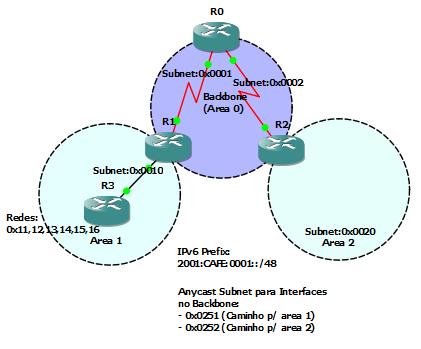
I setup a Multi-area as can be seen in the picture attached and made a summarization of some subnets to see your reflection in the routing table and OSPF in the LSAS. Remember, the OSPFv3 differs slightly from its predecessor on the LSAS, so stay tuned.

As the oldest IOSs not support the OSPFv3 was necessary to use the IOS 12.4 (T) 9, the router 7200. The image is available on this link in the folder IOS – Dynamips.

Emphasize that the configuration in NVRAM of the router is complete, and after setting everything TXTs that are in the file is the initial configuration.

Below the laboratory:

Lab IPv6 and Ospfv3 multiarea 7200

A Abrasive staff,

Maurício Bento Ghem
Continue lendoLaborátorio IPv6 e OSPFv3Lab IPv6 and OSPFv3

Laboratório Multicast – PIMLab Multicast – PIM

Laboratório Multicast PIM Dense e Sparse Mode

Olá Pessoal,

O blog seguindo o fluxo do autor está, também, adquirindo material para a certificação CCNP. Ontem, prosseguindo com o estudo finalizei meu estudo sobre Multicast e agora comecei na parte de IPv6.

Quero contribuir com um laboratório que me auxiliou no entendimento do protocolo PIM (Protocol Indepentent Multicast) que é o protocolo utilizado na BSCI para criar as tabelas de roteamento multicast.


Laboratório Multicast PIM Dense e Sparse Mode

Hello Guys,

The blog following the flow of the author is also acquiring material for CCNP certification. Yesterday, continuing with the study Multicast finish my study and now started on the IPv6.

I contribute a laboratory that helped me in understanding the protocol PIM (Protocol independent Multicast) which is the protocol used in BSCI to create the routing tables multicast.

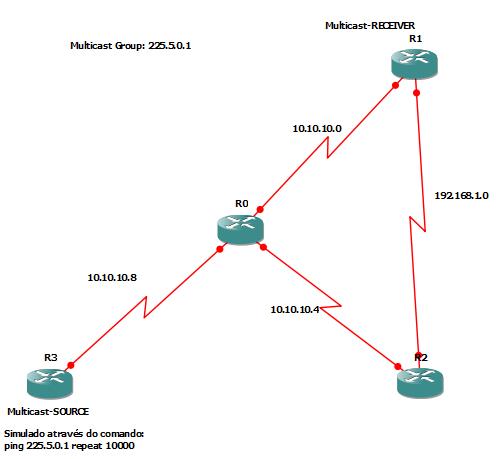
As there are two types of configuration of PIM, dense-mode and Sparse-mode, two laboratories were different and they both use the same topology (see Figure).

The laboratories are TXT files that are the initial settings. The settings are stored in NVRAM of router is the final, to be made tests. If you want to configure from scratch, feel at home. Below I provide them for download and use, pointing out that the router used is the 3600 with IOS 12.3 release 15 and download its IOS can be made in this link, paste IOS – Dynamips.

Download the laboratories can be made below:

Lab Multicast PIM-Dense Mode

Lab Multicast PIM Sparse-mode

Cheers,

Maurício.

Continue lendoLaboratório Multicast – PIMLab Multicast – PIM

Certificado CCNA + Dedicaçao e InspiraçaoCertificate CCNA + Dedication and Inspiration

Mauricio Bento Ghem CCNA

Olá Pessoal,

É com muito prazer que lhes apresento em primeira mão parte do resultado da minha jornada de estudo, o Certificado CCNA.

Eu disse parte, pois o certificado é apenas uma pequena parte do que esta experiência me agregou. A Grande parte foi o conhecimento que tive através do estudo para passar na certificação.

Gostaria de dedicar este certificado aos meus pais e meu irmão por entender quando abria mão de tudo para estudar e principalmente minha namorada por ver minha dedicação e me apoiar a todo momento. Amo todos vocês!

Mauricio Bento Ghem CCNA

Hello Guys,

It is with great pleasure that I present them at first hand the result of my journey of study, the CCNA certificate.

I say part, because the certificate is only a small part of this experience that I added. Much of the knowledge I had was through the study to pass the certification.

I would like to dedicate this certificate to my parents and my brother when opened by hand view of what to study and mainly my girlfriend to see my dedication and support me all the time. I love you all!

This comment I made especially for all who are in quest for certification. Look at the certificate and see your name in this picture, because believe me, you will be the next!

Please note that the certificate only shows what you learned, therefore, study, practice and more than that … LEARN!

Always be here ready to assist them in any way.

A Abrasive staff,

Maurício. Continue lendoCertificado CCNA + Dedicaçao e InspiraçaoCertificate CCNA + Dedication and Inspiration

Ossos do Ofício

Olá Pessoal,

Primeiro gostaria de falar do compromisso que assumi. Esse compromisso é de que me tornaria a disposição para ajudar todos que tem o objetivo comum que, num âmbito mais superior, é crescer. Tenho o maior prazer em ajudar a todos seja da maneira que for, mas venho lhes dizer que por motivos educacionais fortes não estou conseguindo manter 100% um de meus objetivos que é o de atualizar o blog constantemente.

Quero vos falar que adoro escrever, mas devido a muitas atividades acadêmicas e dedicação ao estudo para a  CCNP meu tempo anda tomado. O bom disso, é que as atualizações feitas serão de maior qualidade pois serão bem mais pensadas.

Abro este espaço para todos que tem interesse em se ajudar e que gostam de escrever o bom e velho português para que conversem comigo para tornarem-se escritores do forum e poderem contribuir com material de mesmo nível que vocês estão acostumados a receber. Farei uma seleção para ver o real interesse e qualidade do material em geral que o moderador está disposto a contribuir com a comunidade.

Contato: mauricio [arroba] bentow.com.br

Entrem em contato!

Agradeço pelas sugestões que são enviadas para mim, e também, pelas dúvidas, pois tenho o maior prazer em respondê-las.

Um forte abraço,

Maurício.

BGP – Decisão da melhor rotaBGP – Best route decision

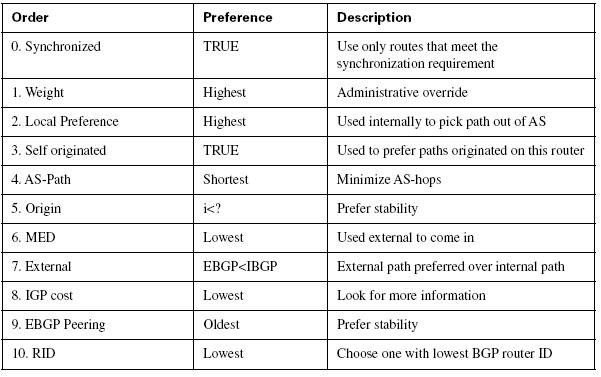
Decisão da melhor rota no BGP.Olá Pessoal,

Continuando nossa etapa de estudo do BGP, apresento-lhes uma ótima figura que apresenta a escolha da melhor rota no BGP, que está disponível no livro:

CCNP BSCI – Official Exam Certification Guide, 4th edition. Escrito pelo: Brent Steward.

O BGP é o protocolo que tem a maior métrica! Ele utiliza atributos e a métrica é gigantesca, pois é composta de diversos destes atributos.


Decisão da melhor rota no BGP.Hello Guys,

Step in our continuing study of BGP, make them a great picture that shows the choice of the best route in BGP, which is available in the book:

CCNP BSCI – Official Exam Certification Guide, 4th edition. Written by: Brent Steward.

The BGP is the protocol that has the highest metric! It uses attributes and metrics is enormous because it is composed of several of these attributes.

The attributes available to do the tuning of BGP are shown below.

Os Atributos do BGP

Abrasive and a success in the study.

Maurício.
Continue lendoBGP – Decisão da melhor rotaBGP – Best route decision