O pessoal do forum blog.ccna.com.br/forum postou um link que contêm diversos resumos de ótima qualidade, chamados de cheatsheets, escrito pelo pessoal do site Packet Life que inclui diversos tópicos que são escopo da CCNA. Abaixo, estão apresentados os links diretos para cada uma dessas cheatsheets.
The staff of the forum blog.ccna.com.br / forum posted a link containing several summaries of excellent quality, calledcheatsheets, written by the staff of the site Life Packet which includes several topics that are scope of CCNA. Below, shows the direct links for each of these cheatsheets.
O STP (Spanning-Tree Protocol) roda em bridges e switches trocando informações através das BPDUs (Bridge Protocol Data Units). Estas BPDUs contêm mensagens de configuração e incluem o ID de cada bridge e são enviadas via frame multicast.
Para operação do STP é eleito uma Root Bridge (switch-raiz). Este switch-raiz torna-se o foco da rede, sendo que as escolhas de porta-raiz, porta-designada e não-designada e todas atualizações da rede são vistas pela perspectiva do switch-raiz. Para elegê-lo os seguintes parâmetros são utilizados:
1. Menor priority value (default é 32768);
2. Menor MAC Address (0000.aaaa.bbbb.cccc.dddd.eeee é menor que 0000.aaab.bbbb.cccc.dddd.eeee).
As portas podem ter os seguintes papeis:
Papel
Descrição
Root port
porta de um switch que possui menor custo ao root bridge. Sempre estão no estado forwarding).
Designated port
porta de um switch que mantêm conectividade. Quando há redundância de conexões, a porta com maior largura de banda é a escolhida. Se as larguras de banda forem iguais, a porta com menor número será a escolhida(ex. e1 escolhida ao invés de e8).
Non-designated port
porta que está em estado blocking. Quando uma porta designada perde a conectividade esta porta assume, até que receba atualização para voltar ao estado blocking
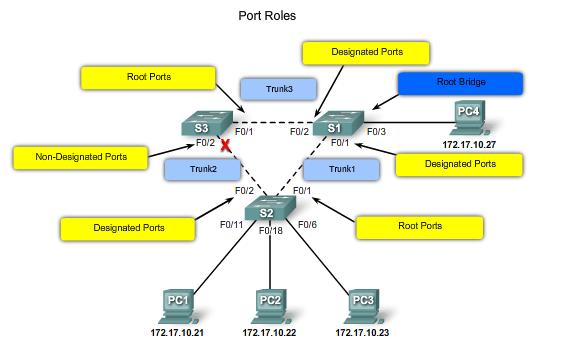
A figura abaixo apresenta uma topologia contendo os termos abordados acima:
Papéis das portas no Spanning-Tree.
Foram visto os papéis que as portas possuem. Agora, serão vistos os estados em que elas podem se encontrar. Tipicamente, switches estão no estado blocking ou forwarding. Abaixo, é apresentado cada um dos estados, na seqüência em que eles ocorrem.
Estado
Descrição
Blocking
Não encaminha frames. Recebe e analisa BPDUs. Ao ligar um switch, ele encontra-se no estado blocking.
Listening
Não encaminha frames, mas recebe e analisa BPDUs para se certificar que não ocorrerão loops na rede.
Learning
Não encaminha frames, recebe e analisa BPDUs e registra os endereços MAC dos dispositivos diretamente conectados.
Forwarding
Envia e recebe frames e tudo mais. Uma porta neste estado é tida como tendo o menor custo ao switch-raiz.
Abaixo, é apresentado os timers das BPDUs:
Timers de cada um tipo de BPDU do STP (Spanning-Tree Protocol).
Abaixo, é apresentado uma animação Flash muito didática que apresenta todo o processo de aprendizagem do Spanning-Tree. A MUST.
Abaixo, seguem os links de referência que foram utilizados para a produção do resumo.
Um interessante, que aprofunda o assunto é a terceira referência. Pode ser encontrada traduzida (pelo google) aqui.
Um abração,
Maurício.
Referências:
– Filippeti, M. – “CCNA 4.1 – Guia Completo de Estudo”, Visual Books/2008.
– Cisco NetAcademy, Academy Connection. “Material oficial Cisco de Estudo”. <http://cisco.netacad.net>. Acesso em: 03/03/2008.
The STP (spanning-Tree Protocol) runs on bridges and switches exchange information through the BPDUs (Bridge Protocol Data Units). These BPDUs contain configuration messages and include the ID of each bridge and are sent via broadcast frames.
For operation of an STP Root Bridge is elected (the root switch). This switch-root becomes the focus of the network, and the choices of the root port, port-designated and non-designated network and all updates are seen by the prospect of the root switch. To elect him the following parameters are used:
1st Lower priority value (default is 32768);
2nd Minor MAC Address (0000.aaaa.bbbb.cccc.dddd.eeee is less than 0000.aaa b. Bbbb.cccc.dddd.eeee).
The doors may have the following roles:
Role
Description
Root port
port on a switch that has lower cost to root bridge. Where are the forwarding state).
Designated port
port on a switch to maintain connectivity. When there are redundant connections, the port with higher bandwidth is chosen. If the band widths are the same, the port with the lowest number will be chosen (eg e1 chosen instead of E8).
Non-designated port
port that is in blocking state. When a designated port loses connectivity to this port is, until it receives back to update the state blocking
The figure below shows a topology with the terms discussed above:
Roles of the ports spanning-Tree.
Have seen the papers that have doors. Now, will see the states where they can find. Typically, the switches are blocking orforwarding state. Below is presented each of the states in the sequence in which they occur.
State
Description
Blocking
Do not forward frames. Receives and analyzes BPDUs. By connecting a switch, it is in blocking state.
Listening
Do not forward frames, but receives and analyzes BPDUs to make sure that no loops occur on the network.
Learning
Do not forward frames, and receives BPDUs analyzes and records the MAC addresses of devices connected directly.
Forwarding
Sends and receives frames and everything. A port in this state is regarded as having the lowest cost to the root switch.
Below is presented the timers of BPDUs:
Timers for each type of BPDU STP (spanning-Tree Protocol).
Below is a flash animation that presents very intuitive the process of learning the spanning-Tree. A MUST.
Below, follow the links to reference that were used to produce the summary.
An interesting, which deepens the matter is the third reference. Can be found translated (by Google) here.
A Abrasive,
Maurício.
References:
– Filippeti, M. – “CCNA 4.1 – Complete Study Guide, Visual Books/2008.
– Cisco NetAcademy, Academy Connection. “Cisco Study Material official.” <http://cisco.netacad.net>. Acesso em: 03/03/2008.
Apresenta a tabela de roteamento. Mostra a rede na qual foi aprendido (dinâmica ou estaticamente), [distância administrativa/métrica] e o IP e a interface na qual foi aprendida esta rota
Apresenta informações dos protocolos de roteamento em execução (resumo e status). São dadas informações como: detalhes específicos de cada protocolo (ex. Router ID para OSPF), redes que está anunciando e vizinhos (fontes) de roteamento.
Apresenta as configurações estipuladas para o protocolo OSPF. Apresenta informações como: Router ID (o maior ID (IP) ou o ID definido na interface Loopback, se existir) e temporizadores.
Apresenta, agora, os Link IDs, ou seja, o ID que cada link (interface) possui, o tempo no qual foi aprendido (age) e o Link ID (ID da interface do roteador) que está anunciando a rota.
Apresenta todas informações OSPF relativo a cada interface. Informações como: endereço IP, área OSPF, Router ID, tipo de rede (ppp,point-to-multipoint), informações sobre DR/BDR(para links ppp o OSPF não elege DRs), timers e informações sobre vizinhos (adjacências).
Apresenta um resumo e status da adjacência com os vizinhos. Este comando apresenta informações como: ID do router vizinho, estado (DR,BDR..), dead time (tempo até a rota se extinguir, ou receber um novo hello), endereço IP do vizinho e interface local do Router no qual se encontra este vizinho.
Apresenta todas as ACLs IP criadas e a quantidade de matches (quantas vezes ela foi aplicada).
Comandos:
R_NH#show ip route

Codes: C - connected, S - static, I - IGRP, R - RIP, M - mobile, B - BGP

D - EIGRP, EX - EIGRP external, O - OSPF, IA - OSPF inter area

N1 - OSPF NSSA external type 1, N2 - OSPF NSSA external type 2

E1 - OSPF external type 1, E2 - OSPF external type 2, E - EGP

i - IS-IS, L1 - IS-IS level-1, L2 - IS-IS level-2, ia - IS-IS inter area

* - candidate default, U - per-user static route, o - ODR

P - periodic downloaded static route
Gateway of last resort is 172.16.1.1 to network 0.0.0.0
172.16.0.0/30 is subnetted, 3 subnets

C       172.16.1.0 is directly connected, Serial0/0.101

O       172.16.2.0 [110/3570] via 172.16.1.1, 00:01:05, Serial0/0.101

O       172.16.3.0 [110/3570] via 172.16.1.1, 00:01:05, Serial0/0.101

C    192.168.20.0/24 is directly connected, FastEthernet0/0

O    192.168.30.0/24 [110/3571] via 172.16.1.1, 00:01:05, Serial0/0.101

O    192.168.40.0/24 [110/3571] via 172.16.1.1, 00:01:05, Serial0/0.101

O*E2 0.0.0.0/0 [110/1] via 172.16.1.1, 00:01:05, Serial0/0.101
R_Matriz#show ip protocols

Routing Protocol is "ospf 20"

Outgoing update filter list for all interfaces is not set

Incoming update filter list for all interfaces is not set

Router ID 201.0.0.2

Number of areas in this router is 1. 1 normal 0 stub 0 nssa

Maximum path: 4

Routing for Networks:

172.16.1.0 0.0.0.3 area 0

172.16.2.0 0.0.0.3 area 0

172.16.3.0 0.0.0.3 area 0

Routing Information Sources:

Gateway         Distance      Last Update

172.16.1.2           110      00:16:43

172.16.2.2           110      00:16:43

172.16.3.2           110      00:16:43

Distance: (default is 110)
R_Matriz#show ip ospf

Routing Process "ospf 20" with ID 201.0.0.2

Supports only single TOS(TOS0) routes

Supports opaque LSA

SPF schedule delay 5 secs, Hold time between two SPFs 10 secs

Minimum LSA interval 5 secs. Minimum LSA arrival 1 secs

Number of external LSA 1. Checksum Sum 0x00f80e

Number of opaque AS LSA 0. Checksum Sum 0x000000

Number of DCbitless external and opaque AS LSA 0

Number of DoNotAge external and opaque AS LSA 0

Number of areas in this router is 1. 1 normal 0 stub 0 nssa

External flood list length 0

Area BACKBONE(0)

Number of interfaces in this area is 3

Area has no authentication

SPF algorithm executed 2 times

Area ranges are

Number of LSA 4. Checksum Sum 0x021d3a

Number of opaque link LSA 0. Checksum Sum 0x000000

Number of DCbitless LSA 0

Number of indication LSA 0

Number of DoNotAge LSA 0

Flood list length 0
R_Matriz#show ip ospf data

OSPF Router with ID (201.0.0.2) (Process ID 20)
Router Link States (Area 0)
Link ID         ADV Router      Age         Seq#       Checksum Link count

192.168.20.1    192.168.20.1    379         0x80000003 0x00d1a1 3

201.0.0.2       201.0.0.2       379         0x80000007 0x000857 6

192.168.40.1    192.168.40.1    379         0x80000003 0x0091a1 3

192.168.30.1    192.168.30.1    379         0x80000003 0x00b1a1 3
Type-5 AS External Link States

Link ID         ADV Router      Age         Seq#       Checksum Tag

0.0.0.0         201.0.0.2       389         0x80000001 0x00f80e 1
R_NH#show ip ospf interface

FastEthernet0/0 is up, line protocol is up

Internet address is 192.168.20.1/24, Area 0

Process ID 20, Router ID 192.168.20.1, Network Type BROADCAST, Cost: 1

Transmit Delay is 1 sec, State DR, Priority 1

Designated Router (ID) 192.168.20.1, Interface address 192.168.20.1

No backup designated router on this network

Timer intervals configured, Hello 10, Dead 40, Wait 40, Retransmit 5

Hello due in 00:00:01

Index 1/1, flood queue length 0

Next 0x0(0)/0x0(0)

Last flood scan length is 1, maximum is 1

Last flood scan time is 0 msec, maximum is 0 msec

Neighbor Count is 0, Adjacent neighbor count is 0

Suppress hello for 0 neighbor(s)

Serial0/0.101 is up, line protocol is up

Internet address is 172.16.1.2/30, Area 0

Process ID 20, Router ID 192.168.20.1, Network Type POINT-TO-POINT, Cost: 1785

Transmit Delay is 1 sec, State POINT-TO-POINT,

Timer intervals configured, Hello 10, Dead 40, Wait 40, Retransmit 5

Hello due in 00:00:01

Index 2/2, flood queue length 0

Next 0x0(0)/0x0(0)

Last flood scan length is 1, maximum is 1

Last flood scan time is 0 msec, maximum is 0 msec

Neighbor Count is 1 , Adjacent neighbor count is 1

Adjacent with neighbor 172.16.1.1

Suppress hello for 0 neighbor(s)
R_Matriz#show ip ospf neighbor

Neighbor ID     Pri   State           Dead Time   Address         Interface

192.168.20.1      1   FULL/-          00:00:37    172.16.1.2      Serial0/0.100

192.168.30.1      1   FULL/-          00:00:37    172.16.2.2      Serial0/0.200

192.168.40.1      1   FULL/-          00:00:37    172.16.3.2      Serial0/0.300
R_Matriz#show ip nat translations

Pro  Inside global     Inside local       Outside local      Outside global

icmp 201.0.0.2:3       192.168.40.3:3     200.213.1.2:3      200.213.1.2:3

tcp 201.0.0.2:1025     192.168.20.3:1025  200.213.1.1:23     200.213.1.1:23
Displays the routing table. Shows the network in what was learned (dynamic or static) [administrative distance / metric] and IP and the interface on which this route was learned
Displays information from routing protocols running (summary and status). Information is given as specific details of each protocol (eg Router ID for OSPF), and advertising networks that are neighbors (source) routing.
Displays the settings set to the OSPF protocol. Displays information such as: Router ID (the highest ID (IP) or the ID defined in the Loopback interface, if any) and timers.
Displays now link the IDs, or the ID for each link (interface) has the time in which it was learned (age) and the link ID (ID of the interface of the router) that is advertising the route.
Displays all information on each OSPF interface. Information such as IP address, OSPF area, Router ID, type of network (ppp, point-to-multipoint), information on DR / BDR (ppp links to the OSPF not elect DRs), timers and information about neighbors (vicinity).
Presents a summary and status of the adjacency with its neighbors.This command displays information such as neighbor router ID, state (DR, BDR ..), dead time (time until the route goes out, or receives a newhello), IP address of the neighbor and the local router interface which is this neighbor.
Displays IP ACLs all created and the number of matches (how many times it was applied).
Commands:
R_NH#show ip route

Codes: C - connected, S - static, I - IGRP, R - RIP, M - mobile, B - BGP

D - EIGRP, EX - EIGRP external, O - OSPF, IA - OSPF inter area

N1 - OSPF NSSA external type 1, N2 - OSPF NSSA external type 2

E1 - OSPF external type 1, E2 - OSPF external type 2, E - EGP

i - IS-IS, L1 - IS-IS level-1, L2 - IS-IS level-2, ia - IS-IS inter area

* - candidate default, U - per-user static route, o - ODR

P - periodic downloaded static route
Gateway of last resort is 172.16.1.1 to network 0.0.0.0
172.16.0.0/30 is subnetted, 3 subnets

C 172.16.1.0 is directly connected, Serial0/0.101

O 172.16.2.0 [110/3570] via 172.16.1.1, 00:01:05, Serial0/0.101

O 172.16.3.0 [110/3570] via 172.16.1.1, 00:01:05, Serial0/0.101

C 192.168.20.0/24 is directly connected, FastEthernet0/0

O 192.168.30.0/24 [110/3571] via 172.16.1.1, 00:01:05, Serial0/0.101

O 192.168.40.0/24 [110/3571] via 172.16.1.1, 00:01:05, Serial0/0.101

O*E2 0.0.0.0/0 [110/1] via 172.16.1.1, 00:01:05, Serial0/0.101
R_Matriz#show ip protocols

Routing Protocol is “ospf 20?

Outgoing update filter list for all interfaces is not set

Incoming update filter list for all interfaces is not set

Router ID 201.0.0.2

Number of areas in this router is 1. 1 normal 0 stub 0 nssa

Maximum path: 4

Routing for Networks:

172.16.1.0 0.0.0.3 area 0

172.16.2.0 0.0.0.3 area 0

172.16.3.0 0.0.0.3 area 0

Routing Information Sources:

Gateway Distance Last Update

172.16.1.2 110 00:16:43

172.16.2.2 110 00:16:43

172.16.3.2 110 00:16:43

Distance: (default is 110)
00:16:43 R_Matriz#show ip protocols
Routing Protocol is “ospf 20?
Outgoing update filter list for all interfaces is not set
Incoming update filter list for all interfaces is not set
Router ID 201.0.0.2
Number of areas in this router is 1. 1 normal 0 stub 0 nssa
Maximum path: 4
Routing for Networks:
172.16.1.0 0.0.0.3 area 0
172.16.2.0 0.0.0.3 area 0
172.16.3.0 0.0.0.3 area 0
Routing Information Sources:
Gateway Distance Last Update
172.16.1.2 110 00:16:43
172.16.2.2 110 00:16:43
172.16.3.2 110 00:16:43
Distance: (default is 110) 00:16:43 R_Matriz#show ip protocols
Routing Protocol is “ospf 20?
Outgoing update filter list for all interfaces is not set
Incoming update filter list for all interfaces is not set
Router ID 201.0.0.2
Number of areas in this router is 1. 1 normal 0 stub 0 nssa
Maximum path: 4
Routing for Networks:
172.16.1.0 0.0.0.3 area 0
172.16.2.0 0.0.0.3 area 0
172.16.3.0 0.0.0.3 area 0
Routing Information Sources:
Gateway Distance Last Update
172.16.1.2 110 00:16:43
172.16.2.2 110 00:16:43
172.16.3.2 110 00:16:43
Distance: (default is 110) 00:16:43 R_Matriz#show ip protocols
Routing Protocol is “ospf 20?
Outgoing update filter list for all interfaces is not set
Incoming update filter list for all interfaces is not set
Router ID 201.0.0.2
Number of areas in this router is 1. 1 normal 0 stub 0 nssa
Maximum path: 4
Routing for Networks:
172.16.1.0 0.0.0.3 area 0
172.16.2.0 0.0.0.3 area 0
172.16.3.0 0.0.0.3 area 0
Routing Information Sources:
Gateway Distance Last Update
172.16.1.2 110 00:16:43
172.16.2.2 110 00:16:43
172.16.3.2 110 00:16:43
Distance: (default is 110)
R_Matriz#show ip ospf

Routing Process “ospf 20? with ID 201.0.0.2

Supports only single TOS(TOS0) routes

Supports opaque LSA

SPF schedule delay 5 secs, Hold time between two SPFs 10 secs

Minimum LSA interval 5 secs. Minimum LSA arrival 1 secs

Number of external LSA 1. Checksum Sum 0×00f80e

Number of opaque AS LSA 0. Checksum Sum 0×000000

Number of DCbitless external and opaque AS LSA 0

Number of DoNotAge external and opaque AS LSA 0

Number of areas in this router is 1. 1 normal 0 stub 0 nssa

External flood list length 0

Area BACKBONE(0)

Number of interfaces in this area is 3

Area has no authentication

SPF algorithm executed 2 times

Area ranges are

Number of LSA 4. Checksum Sum 0×021d3a

Number of opaque link LSA 0. Checksum Sum 0×000000

Number of DCbitless LSA 0

Number of indication LSA 0

Number of DoNotAge LSA 0

Flood list length 0
R_Matriz#show ip ospf data

OSPF Router with ID (201.0.0.2) (Process ID 20)
Router Link States (Area 0)
Link ID ADV Router Age Seq# Checksum Link count

192.168.20.1 192.168.20.1 379 0x80000003 0x00d1a1 3

201.0.0.2 201.0.0.2 379 0x80000007 0x000857 6

192.168.40.1 192.168.40.1 379 0x80000003 0x0091a1 3

192.168.30.1 192.168.30.1 379 0x80000003 0x00b1a1 3
Type-5 AS External Link States

Link ID ADV Router Age Seq# Checksum Tag

0.0.0.0 201.0.0.2 389 0x80000001 0x00f80e 1
R_NH#show ip ospf interface

FastEthernet0/0 is up, line protocol is up

Internet address is 192.168.20.1/24, Area 0

Process ID 20, Router ID 192.168.20.1, Network Type BROADCAST, Cost: 1

Transmit Delay is 1 sec, State DR, Priority 1

Designated Router (ID) 192.168.20.1, Interface address 192.168.20.1

No backup designated router on this network

Timer intervals configured, Hello 10, Dead 40, Wait 40, Retransmit 5

Hello due in 00:00:01

Index 1/1, flood queue length 0

Next 0×0(0)/0×0(0)

Last flood scan length is 1, maximum is 1

Last flood scan time is 0 msec, maximum is 0 msec

Neighbor Count is 0, Adjacent neighbor count is 0

Suppress hello for 0 neighbor(s)

Serial0/0.101 is up, line protocol is up

Internet address is 172.16.1.2/30, Area 0

Process ID 20, Router ID 192.168.20.1, Network Type POINT-TO-POINT, Cost: 1785

Transmit Delay is 1 sec, State POINT-TO-POINT,

Timer intervals configured, Hello 10, Dead 40, Wait 40, Retransmit 5

Hello due in 00:00:01

Index 2/2, flood queue length 0

Next 0×0(0)/0×0(0)

Last flood scan length is 1, maximum is 1

Last flood scan time is 0 msec, maximum is 0 msec

Neighbor Count is 1 , Adjacent neighbor count is 1

Adjacent with neighbor 172.16.1.1

Suppress hello for 0 neighbor(s)
R_Matriz#show ip ospf neighbor

Neighbor ID Pri State Dead Time Address Interface

192.168.20.1 1 FULL/- 00:00:37 172.16.1.2 Serial0/0.100

192.168.30.1 1 FULL/- 00:00:37 172.16.2.2 Serial0/0.200

192.168.40.1 1 FULL/- 00:00:37 172.16.3.2 Serial0/0.300
R_Matriz#show ip nat translations

Pro Inside global Inside local Outside local Outside global

icmp 201.0.0.2:3 192.168.40.3:3 200.213.1.2:3 200.213.1.2:3

tcp 201.0.0.2:1025 192.168.20.3:1025 200.213.1.1:23 200.213.1.1:23
Com base no laboratório de Frame-Relay publicado anteriormente neste Post e após todo o estudo da topologia rodei os comandos abaixo, coloquei suas saídas e fiz uma tabela com uma descrição completa do que cada comando apresenta. Há um link no comando que leva diretamente para seu output.
Espero que seja de bom uso esta tabela, pois eu a utilizarei.
Apresenta a tabela de roteamento. Mostra a rede na qual foi aprendido (dinâmica ou estaticamente), [distância administrativa/métrica] e o IP e a interface na qual foi aprendida esta rota
Apresenta os vizinhos rodando EIGRP e dados como: IP do vizinho, interface, Holdtime, Uptime, SRTT (Smooth Round Trip Time), RTO (Retransmission Time Out), Q Cnt (Queue), Seq Num.
Apresenta o mapeamento IP -> DLCI (Data Link Connection Identifier), normalmente criado através do comando frame map, ou através da tradução dinâmica pelo Inverse ARP.
Apresenta estatísticas em cada circuito frame-relay e outros dados tais como: interfaces e respectivos DLCI, tráfego, bits DE (Discard Eligibility), FECN (Forward-Explicit Congestion Notification), BECN (Backward-Explicit Congestion Notification).
Apresenta informações referente aos vizinhos tais como: Device ID (Hostname), Local Intrf (Interface que este router está recebendo os pacotes cdp), HoldTime, Capability (Router / Switch…), Plataform (Modelo), Port ID (Porta remota).
Mesmo comando que o anterior, mudando que pode-se selecionar apenas um dispositivo pelo seu ID.
OUTPUTS:
R_Caxias#show interfaces

FastEthernet0/0 is up, line protocol is up (connected)

 Hardware is Lance, address is 0001.4211.2e01 (bia 0001.4211.2e01)

 Internet address is 192.168.30.1/24

 MTU 1500 bytes, BW 100000 Kbit, DLY 100 usec, rely 255/255, load 1/255

 Encapsulation ARPA, loopback not set

 ARP type: ARPA, ARP Timeout 04:00:00,

 Last input 00:00:08, output 00:00:05, output hang never

 Last clearing of "show interface" counters never

 Queueing strategy: fifo

 Output queue :0/40 (size/max)

 5 minute input rate 0 bits/sec, 0 packets/sec

 5 minute output rate 124 bits/sec, 0 packets/sec

 0 packets input, 0 bytes, 0 no buffer

 Received 0 broadcasts, 0 runts, 0 giants, 0 throttles

 0 input errors, 0 CRC, 0 frame, 0 overrun, 0 ignored, 0 abort

 0 input packets with dribble condition detected

 789 packets output, 56808 bytes, 0 underruns

 0 output errors, 0 collisions, 1 interface resets

 0 babbles, 0 late collision, 0 deferred

 0 lost carrier, 0 no carrier

 0 output buffer failures, 0 output buffers swapped out
R_Caxias#show ip interface

FastEthernet0/0 is up, line protocol is up (connected)

 Internet address is 192.168.30.1/24

 Broadcast address is 255.255.255.255

 Address determined by setup command

 MTU is 1500 bytes

 Helper address is not set

 Directed broadcast forwarding is disabled

 Outgoing access list is not set

 Inbound  access list is not set

 Proxy ARP is enabled

 Security level is default

 Split horizon is enabled

 ICMP redirects are always sent

 ICMP unreachables are always sent

 ICMP mask replies are never sent

 IP fast switching is disabled

 IP fast switching on the same interface is disabled

 IP Flow switching is disabled

 IP Fast switching turbo vector

 IP multicast fast switching is disabled

 IP multicast distributed fast switching is disabled

 Router Discovery is disabled

 IP output packet accounting is disabled

 IP access violation accounting is disabled

 TCP/IP header compression is disabled

 RTP/IP header compression is disabled

 Probe proxy name replies are disabled

 Policy routing is disabled

 Network address translation is disabled

 WCCP Redirect outbound is disabled

 WCCP Redirect exclude is disabled

 BGP Policy Mapping is disabled
R_Caxias#show ip interface brief

Interface              IP-Address      OK? Method Status                Protocol

FastEthernet0/0        192.168.30.1    YES manual up                    up

FastEthernet0/1        unassigned      YES manual administratively down down

Serial0/0              unassigned      YES manual up                    up

Serial0/0.201          172.16.2.2      YES manual up                    up

Serial0/1              unassigned      YES manual administratively down down
R_Caxias#show protocols

Global values:

 Internet Protocol routing is enabled

FastEthernet0/0 is up, line protocol is up

 Internet address is 192.168.30.1/24

FastEthernet0/1 is administratively down, line protocol is down

Serial0/0 is up, line protocol is up

Serial0/0.201 is up, line protocol is up

 Internet address is 172.16.2.2/30

Serial0/1 is administratively down, line protocol is down
R_Caxias#show ip protocols

Routing Protocol is "eigrp  10 "

 Outgoing update filter list for all interfaces is not set

 Incoming update filter list for all interfaces is not set

 Default networks flagged in outgoing updates

 Default networks accepted from incoming updates

 EIGRP metric weight K1=1, K2=0, K3=1, K4=0, K5=0

 EIGRP maximum hopcount 100

 EIGRP maximum metric variance 1

Redistributing: eigrp 10

 Automatic network summarization is not in effect

 Maximum path: 4

 Routing for Networks:

 192.168.30.0

 172.16.0.0

 Routing Information Sources:

 Gateway         Distance      Last Update

 172.16.2.1      90            10

 Distance: internal 90 external 170
R_Caxias#show ip route

Codes: C - connected, S - static, I - IGRP, R - RIP, M - mobile, B - BGP

 D - EIGRP, EX - EIGRP external, O - OSPF, IA - OSPF inter area

 N1 - OSPF NSSA external type 1, N2 - OSPF NSSA external type 2

 E1 - OSPF external type 1, E2 - OSPF external type 2, E - EGP

 i - IS-IS, L1 - IS-IS level-1, L2 - IS-IS level-2, ia - IS-IS inter area

 * - candidate default, U - per-user static route, o - ODR

 P - periodic downloaded static route


Gateway of last resort is 172.16.2.1 to network 0.0.0.0


 172.16.0.0/30 is subnetted, 3 subnets

D       172.16.1.0 [90/46738176] via 172.16.2.1, 00:29:06, Serial0/0.201

C       172.16.2.0 is directly connected, Serial0/0.201

D       172.16.3.0 [90/46738176] via 172.16.2.1, 00:29:06, Serial0/0.201

D    192.168.20.0/24 [90/46740736] via 172.16.2.1, 00:29:06, Serial0/0.201

C    192.168.30.0/24 is directly connected, FastEthernet0/0

D    192.168.40.0/24 [90/46740736] via 172.16.2.1, 00:29:06, Serial0/0.201

D*EX 0.0.0.0/0 [170/46738176] via 172.16.2.1, 00:29:06, Serial0/0.201
R_Caxias#show ip eigrp interfaces

IP-EIGRP interfaces for process 10


 Xmit Queue   Mean   Pacing Time   Multicast    Pending

Interface        Peers  Un/Reliable  SRTT   Un/Reliable   Flow Timer   Routes

Fa0/0              0        0/0      1236       0/10           0           0

Ser                1        0/0      1236       0/10           0           0

R_Caxias#show ip eigrp interfaces ?

<1-65535>  AS Number
R_Matriz#show ip eigrp neighbors

IP-EIGRP neighbors for process 10

H   Address         Interface      Hold Uptime    SRTT   RTO   Q   Seq

 (sec)          (ms)        Cnt  Num

0   172.16.3.2      Ser            14   01:01:00  40     1000  0   11

1   172.16.1.2      Ser            11   01:01:00  40     1000  0   11

2   172.16.2.2      Ser            14   01:01:00  40     1000  0   11
R_Caxias#show ip eigrp topology

IP-EIGRP Topology Table for AS 10


Codes: P - Passive, A - Active, U - Update, Q - Query, R - Reply,

 r - Reply status


P 192.168.30.0/24, 1 successors, FD is 28160

 via Connected, FastEthernet0/0

P 172.16.2.0/30, 1 successors, FD is 46226176

 via Connected, Serial0/0.201

P 172.16.1.0/30, 1 successors, FD is 46738176

 via 172.16.2.1 (46738176/46226176), Serial0/0.201

P 172.16.3.0/30, 1 successors, FD is 46738176

 via 172.16.2.1 (46738176/46226176), Serial0/0.201

P 0.0.0.0/0, 1 successors, FD is 46738176

 via 172.16.2.1 (46738176/2169856), Serial0/0.201

P 192.168.20.0/24, 1 successors, FD is 46740736

 via 172.16.2.1 (46740736/46228736), Serial0/0.201

P 192.168.40.0/24, 1 successors, FD is 46740736

 via 172.16.2.1 (46740736/46228736), Serial0/0.201
R_Caxias#show ip eigrp traffic

IP-EIGRP Traffic Statistics for process 10

 Hellos sent/received: 882/873

 Updates sent/received: 6/4

 Queries sent/received: 0/0

 Replies sent/received:  0/0

 Acks sent/received:  1/4

 Input queue high water mark 1, 0 drops

 SIA-Queries sent/received: 0/0

SIA-Replies sent/received: 0/0
R_Caxias#show frame-relay lmi

LMI Statistics for interface Serial0/0 (Frame Relay DTE) LMI TYPE = CISCO

 Invalid Unnumbered info 0      Invalid Prot Disc 0

 Invalid dummy Call Ref 0       Invalid Msg Type 0

 Invalid Status Message 0       Invalid Lock Shift 0

 Invalid Information ID 0       Invalid Report IE Len 0

 Invalid Report Request 0       Invalid Keep IE Len 0

 Num Status Enq. Sent 549       Num Status msgs Rcvd 549

 Num Update Status Rcvd 0       Num Status Timeouts 16


LMI Statistics for interface Serial0/0.201 (Frame Relay DTE) LMI TYPE = CISCO

 Invalid Unnumbered info 0      Invalid Prot Disc 0

 Invalid dummy Call Ref 0       Invalid Msg Type 0

 Invalid Status Message 0       Invalid Lock Shift 0

 Invalid Information ID 0       Invalid Report IE Len 0

 Invalid Report Request 0       Invalid Keep IE Len 0

 Num Status Enq. Sent 0         Num Status msgs Rcvd 0

 Num Update Status Rcvd 0       Num Status Timeouts 16
R_Matriz#show frame-relay map

Serial0/0.100 (up): point-to-point dlci, dlci 100, broadcast, status defined, active

Serial0/0.200 (up): point-to-point dlci, dlci 200, broadcast, status defined, active

Serial0/0.300 (up): point-to-point dlci, dlci 300, broadcast, status defined, active
R_Matriz#show frame-relay pvc

PVC Statistics for interface Serial0/0 (Frame Relay DTE)

DLCI = 100, DLCI USAGE = LOCAL, PVC STATUS = ACTIVE, INTERFACE = Serial0/0.100


input pkts 14055       output pkts 32795        in bytes 1096228

out bytes 6216155      dropped pkts 0           in FECN pkts 0

in BECN pkts 0         out FECN pkts 0          out BECN pkts 0

in DE pkts 0           out DE pkts 0

out bcast pkts 32795   out bcast bytes 6216155


DLCI = 200, DLCI USAGE = LOCAL, PVC STATUS = ACTIVE, INTERFACE = Serial0/0.200


input pkts 14055       output pkts 32795        in bytes 1096228

out bytes 6216155      dropped pkts 0           in FECN pkts 0

in BECN pkts 0         out FECN pkts 0          out BECN pkts 0

in DE pkts 0           out DE pkts 0

out bcast pkts 32795   out bcast bytes 6216155


DLCI = 300, DLCI USAGE = LOCAL, PVC STATUS = ACTIVE, INTERFACE = Serial0/0.300


input pkts 14055       output pkts 32795        in bytes 1096228

out bytes 6216155      dropped pkts 0           in FECN pkts 0

in BECN pkts 0         out FECN pkts 0          out BECN pkts 0

in DE pkts 0           out DE pkts 0

out bcast pkts 32795   out bcast bytes 6216155


R_Matriz#show frame-relay pvc ?

 <16-1022>  DLCI

interface  show frame relay information on one interface
R_Matriz#show cdp

Global CDP information:

 Sending CDP packets every 60 seconds

 Sending a holdtime value of 180 seconds

 Sending CDPv2 advertisements is enabled

R_Matriz#show cdp ?

 entry      Information for specific neighbor entry

 interface  CDP interface status and configuration

neighbors  CDP neighbor entries
R_Matriz#show cdp neighbors

Capability Codes: R - Router, T - Trans Bridge, B - Source Route Bridge

 S - Switch, H - Host, I - IGMP, r - Repeater, P - Phone

Device ID    Local Intrfce   Holdtme    Capability   Platform    Port ID

R_Embratel   Ser 0/1          180            R       C2600       Ser 0/0
R_Matriz#show cdp neighbors detail || show cdp entry *

Device ID: R_Embratel

Entry address(es):

 IP address : 201.0.0.1

Platform: cisco C2600, Capabilities: Router

Interface: Serial0/1, Port ID (outgoing port): Serial0/0

Holdtime: 180


Version :

Cisco Internetwork Operating System Software

IOS (tm) C2600 Software (C2600-I-M), Version 12.2(28), RELEASE SOFTWARE (fc5)

Technical Support: http://www.cisco.com/techsupport

Copyright (c) 1986-2005 by cisco Systems, Inc.

Compiled Wed 27-Apr-04 19:01 by miwang


advertisement version: 2

Duplex: full
Referências:
– Filippeti, M. – “CCNA 4.1 – Guia Completo de Estudo”, Visual Books/2008.
– Cisco NetAcademy, Academy Connection. “Material oficial Cisco de Estudo”. <http://cisco.netacad.net>. Acesso em: 27/02/2008.Hello Guys,
Based on the laboratory of Frame-Relay published earlier in this post and after all the study of topology tergiversation the commands below, put their exits and made a table with a full description of what each line offers. There is a link that leads directly in charge for their output.
I hope that is good use of this table, because I use.
Displays the routing table. Shows the network in what was learned (dynamic or static) [administrative distance / metric] and IP and the interface on which this route was learned
Displays the IP mapping -> DLCI (Data Link Connection Identifier), usually created by using the frame map, or through dynamic translation by Inverse ARP.
Displays statistics for each frame-relay circuit and other data such as interfaces and DLCI, traffic, DE bit (Discard Eligibility), FECN (Forward-Explicit Congestion Notification), BECN (Backward-Explicit Congestion Notification).
Presents information regarding neighbors such as: Device ID (Hostname), Local Intrf (Interface that the router is receiving packets CDP), HoldTime, Capability (Router / Switch …), platform (Model), Port ID (remote port).
Same command as before, changing that you can select only one device by its ID.
OUTPUTS:
R_Caxias#show interfaces

FastEthernet0/0 is up, line protocol is up (connected)

Hardware is Lance, address is 0001.4211.2e01 (bia 0001.4211.2e01)

Internet address is 192.168.30.1/24

MTU 1500 bytes, BW 100000 Kbit, DLY 100 usec, rely 255/255, load 1/255

Encapsulation ARPA, loopback not set

ARP type: ARPA, ARP Timeout 04:00:00,

Last input 00:00:08, output 00:00:05, output hang never

Last clearing of "show interface" counters never

Queueing strategy: fifo

Output queue :0/40 (size/max)

5 minute input rate 0 bits/sec, 0 packets/sec

5 minute output rate 124 bits/sec, 0 packets/sec

0 packets input, 0 bytes, 0 no buffer

Received 0 broadcasts, 0 runts, 0 giants, 0 throttles

0 input errors, 0 CRC, 0 frame, 0 overrun, 0 ignored, 0 abort

0 input packets with dribble condition detected

789 packets output, 56808 bytes, 0 underruns

0 output errors, 0 collisions, 1 interface resets

0 babbles, 0 late collision, 0 deferred

0 lost carrier, 0 no carrier

0 output buffer failures, 0 output buffers swapped out
R_Caxias#show ip interface

FastEthernet0/0 is up, line protocol is up (connected)

Internet address is 192.168.30.1/24

Broadcast address is 255.255.255.255

Address determined by setup command

MTU is 1500 bytes

Helper address is not set

Directed broadcast forwarding is disabled

Outgoing access list is not set

Inbound access list is not set

Proxy ARP is enabled

Security level is default

Split horizon is enabled

ICMP redirects are always sent

ICMP unreachables are always sent

ICMP mask replies are never sent

IP fast switching is disabled

IP fast switching on the same interface is disabled

IP Flow switching is disabled

IP Fast switching turbo vector

IP multicast fast switching is disabled

IP multicast distributed fast switching is disabled

Router Discovery is disabled

IP output packet accounting is disabled

IP access violation accounting is disabled

TCP/IP header compression is disabled

RTP/IP header compression is disabled

Probe proxy name replies are disabled

Policy routing is disabled

Network address translation is disabled

WCCP Redirect outbound is disabled

WCCP Redirect exclude is disabled

BGP Policy Mapping is disabled
255255255255 R_Caxias#show ip interface
FastEthernet0/0 is up, line protocol is up (connected)
Internet address is 192.168.30.1/24
Broadcast address is 255.255.255.255
Address determined by setup command
MTU is 1500 bytes
Helper address is not set
Directed broadcast forwarding is disabled
Outgoing access list is not set
Inbound access list is not set
Proxy ARP is enabled
Security level is default
Split horizon is enabled
ICMP redirects are always sent
ICMP unreachables are always sent
ICMP mask replies are never sent
IP fast switching is disabled
IP fast switching on the same interface is disabled
IP Flow switching is disabled
IP Fast switching turbo vector
IP multicast fast switching is disabled
IP multicast distributed fast switching is disabled
Router Discovery is disabled
IP output packet accounting is disabled
IP access violation accounting is disabled
TCP/IP header compression is disabled
RTP/IP header compression is disabled
Probe proxy name replies are disabled
Policy routing is disabled
Network address translation is disabled
WCCP Redirect outbound is disabled
WCCP Redirect exclude is disabled
BGP Policy Mapping is disabled
R_Caxias#show ip interface brief

Interface IP-Address OK? Method Status Protocol

FastEthernet0/0 192.168.30.1 YES manual up up

FastEthernet0/1 unassigned YES manual administratively down down

Serial0/0 unassigned YES manual up up

Serial0/0.201 172.16.2.2 YES manual up up

Serial0/1 unassigned YES manual administratively down down
192.168.30.1 R_Caxias#show ip interface brief
Interface IP-Address OK? Method Status Protocol
FastEthernet0/0 192.168.30.1 YES manual up up
FastEthernet0/1 unassigned YES manual administratively down down
Serial0/0 unassigned YES manual up up
Serial0/0.201 172.16.2.2 YES manual up up
Serial0/1 unassigned YES manual administratively down down
R_Caxias#show protocols

Global values:

Internet Protocol routing is enabled

FastEthernet0/0 is up, line protocol is up

Internet address is 192.168.30.1/24

FastEthernet0/1 is administratively down, line protocol is down

Serial0/0 is up, line protocol is up

Serial0/0.201 is up, line protocol is up

Internet address is 172.16.2.2/30

Serial0/1 is administratively down, line protocol is down
R_Caxias#show ip protocols

Routing Protocol is "eigrp 10 "

Outgoing update filter list for all interfaces is not set

Incoming update filter list for all interfaces is not set

Default networks flagged in outgoing updates

Default networks accepted from incoming updates

EIGRP metric weight K1=1, K2=0, K3=1, K4=0, K5=0

EIGRP maximum hopcount 100

EIGRP maximum metric variance 1

Redistributing: eigrp 10

Automatic network summarization is not in effect

Maximum path: 4

Routing for Networks:

192.168.30.0

172.16.0.0

Routing Information Sources:

Gateway Distance Last Update

172.16.2.1 90 10

Distance: internal 90 external 170
R_Caxias#show ip route

Codes: C - connected, S - static, I - IGRP, R - RIP, M - mobile, B - BGP

D - EIGRP, EX - EIGRP external, O - OSPF, IA - OSPF inter area

N1 - OSPF NSSA external type 1, N2 - OSPF NSSA external type 2

E1 - OSPF external type 1, E2 - OSPF external type 2, E - EGP

i - IS-IS, L1 - IS-IS level-1, L2 - IS-IS level-2, ia - IS-IS inter area

* - candidate default, U - per-user static route, o - ODR

P - periodic downloaded static route
Gateway of last resort is 172.16.2.1 to network 0.0.0.0
172.16.0.0/30 is subnetted, 3 subnets

D 172.16.1.0 [90/46738176] via 172.16.2.1, 00:29:06, Serial0/0.201

C 172.16.2.0 is directly connected, Serial0/0.201

D 172.16.3.0 [90/46738176] via 172.16.2.1, 00:29:06, Serial0/0.201

D 192.168.20.0/24 [90/46740736] via 172.16.2.1, 00:29:06, Serial0/0.201

C 192.168.30.0/24 is directly connected, FastEthernet0/0

D 192.168.40.0/24 [90/46740736] via 172.16.2.1, 00:29:06, Serial0/0.201

D*EX 0.0.0.0/0 [170/46738176] via 172.16.2.1, 00:29:06, Serial0/0.201
R_Caxias#show ip eigrp interfaces

IP-EIGRP interfaces for process 10
Xmit Queue Mean Pacing Time Multicast Pending

Interface Peers Un/Reliable SRTT Un/Reliable Flow Timer Routes

Fa0/0 0 0/0 1236 0/10 0 0

Ser 1 0/0 1236 0/10 0 0

R_Caxias#show ip eigrp interfaces ?

<1-65535> AS Number
R_Matriz#show ip eigrp neighbors

IP-EIGRP neighbors for process 10

H Address Interface Hold Uptime SRTT RTO Q Seq

(sec) (ms) Cnt Num

0 172.16.3.2 Ser 14 01:01:00 40 1000 0 11

1 172.16.1.2 Ser 11 01:01:00 40 1000 0 11

2 172.16.2.2 Ser 14 01:01:00 40 1000 0 11
172.16.3.2 R_Matriz#show ip eigrp neighbors
IP-EIGRP neighbors for process 10
H Address Interface Hold Uptime SRTT RTO Q Seq
(sec) (ms) Cnt Num
0 172.16.3.2 Ser 14 01:01:00 40 1000 0 11
1 172.16.1.2 Ser 11 01:01:00 40 1000 0 11
2 172.16.2.2 Ser 14 01:01:00 40 1000 0 11 01:01:00 R_Matriz#show ip eigrp neighbors
IP-EIGRP neighbors for process 10
H Address Interface Hold Uptime SRTT RTO Q Seq
(sec) (ms) Cnt Num
0 172.16.3.2 Ser 14 01:01:00 40 1000 0 11
1 172.16.1.2 Ser 11 01:01:00 40 1000 0 11
2 172.16.2.2 Ser 14 01:01:00 40 1000 0 11 172.16.1.2 R_Matriz#show ip eigrp neighbors
IP-EIGRP neighbors for process 10
H Address Interface Hold Uptime SRTT RTO Q Seq
(sec) (ms) Cnt Num
0 172.16.3.2 Ser 14 01:01:00 40 1000 0 11
1 172.16.1.2 Ser 11 01:01:00 40 1000 0 11
2 172.16.2.2 Ser 14 01:01:00 40 1000 0 11 01:01:00 R_Matriz#show ip eigrp neighbors
IP-EIGRP neighbors for process 10
H Address Interface Hold Uptime SRTT RTO Q Seq
(sec) (ms) Cnt Num
0 172.16.3.2 Ser 14 01:01:00 40 1000 0 11
1 172.16.1.2 Ser 11 01:01:00 40 1000 0 11
2 172.16.2.2 Ser 14 01:01:00 40 1000 0 11 172.16.2.2 R_Matriz#show ip eigrp neighbors
IP-EIGRP neighbors for process 10
H Address Interface Hold Uptime SRTT RTO Q Seq
(sec) (ms) Cnt Num
0 172.16.3.2 Ser 14 01:01:00 40 1000 0 11
1 172.16.1.2 Ser 11 01:01:00 40 1000 0 11
2 172.16.2.2 Ser 14 01:01:00 40 1000 0 11 01:01:00 R_Matriz#show ip eigrp neighbors
IP-EIGRP neighbors for process 10
H Address Interface Hold Uptime SRTT RTO Q Seq
(sec) (ms) Cnt Num
0 172.16.3.2 Ser 14 01:01:00 40 1000 0 11
1 172.16.1.2 Ser 11 01:01:00 40 1000 0 11
2 172.16.2.2 Ser 14 01:01:00 40 1000 0 11
R_Caxias#show ip eigrp topology

IP-EIGRP Topology Table for AS 10
Codes: P - Passive, A - Active, U - Update, Q - Query, R - Reply,

r - Reply status
P 192.168.30.0/24, 1 successors, FD is 28160

via Connected, FastEthernet0/0

P 172.16.2.0/30, 1 successors, FD is 46226176

via Connected, Serial0/0.201

P 172.16.1.0/30, 1 successors, FD is 46738176

via 172.16.2.1 (46738176/46226176), Serial0/0.201

P 172.16.3.0/30, 1 successors, FD is 46738176

via 172.16.2.1 (46738176/46226176), Serial0/0.201

P 0.0.0.0/0, 1 successors, FD is 46738176

via 172.16.2.1 (46738176/2169856), Serial0/0.201

P 192.168.20.0/24, 1 successors, FD is 46740736

via 172.16.2.1 (46740736/46228736), Serial0/0.201

P 192.168.40.0/24, 1 successors, FD is 46740736

via 172.16.2.1 (46740736/46228736), Serial0/0.201
R_Caxias#show ip eigrp traffic

IP-EIGRP Traffic Statistics for process 10

Hellos sent/received: 882/873

Updates sent/received: 6/4

Queries sent/received: 0/0

Replies sent/received: 0/0

Acks sent/received: 1/4

Input queue high water mark 1, 0 drops

SIA-Queries sent/received: 0/0

SIA-Replies sent/received: 0/0
R_Caxias#show frame-relay lmi

LMI Statistics for interface Serial0/0 (Frame Relay DTE) LMI TYPE = CISCO

Invalid Unnumbered info 0 Invalid Prot Disc 0

Invalid dummy Call Ref 0 Invalid Msg Type 0

Invalid Status Message 0 Invalid Lock Shift 0

Invalid Information ID 0 Invalid Report IE Len 0

Invalid Report Request 0 Invalid Keep IE Len 0

Num Status Enq. Sent 549 Num Status msgs Rcvd 549

Num Update Status Rcvd 0 Num Status Timeouts 16
LMI Statistics for interface Serial0/0.201 (Frame Relay DTE) LMI TYPE = CISCO

Invalid Unnumbered info 0 Invalid Prot Disc 0

Invalid dummy Call Ref 0 Invalid Msg Type 0

Invalid Status Message 0 Invalid Lock Shift 0

Invalid Information ID 0 Invalid Report IE Len 0

Invalid Report Request 0 Invalid Keep IE Len 0

Num Status Enq. Sent 0 Num Status msgs Rcvd 0

Num Update Status Rcvd 0 Num Status Timeouts 16
R_Matriz#show frame-relay map

Serial0/0.100 (up): point-to-point dlci, dlci 100, broadcast, status defined, active

Serial0/0.200 (up): point-to-point dlci, dlci 200, broadcast, status defined, active

Serial0/0.300 (up): point-to-point dlci, dlci 300, broadcast, status defined, active
input pkts 14055 output pkts 32795 in bytes 1096228

out bytes 6216155 dropped pkts 0 in FECN pkts 0

in BECN pkts 0 out FECN pkts 0 out BECN pkts 0

in DE pkts 0 out DE pkts 0

out bcast pkts 32795 out bcast bytes 6216155
input pkts 14055 output pkts 32795 in bytes 1096228
out bytes 6216155 dropped pkts 0 in FECN pkts 0
in BECN pkts 0 out FECN pkts 0 out BECN pkts 0
in DE pkts 0 out DE pkts 0
out bcast pkts 32795 out bcast bytes 6216155
input pkts 14055 output pkts 32795 in bytes 1096228
out bytes 6216155 dropped pkts 0 in FECN pkts 0
in BECN pkts 0 out FECN pkts 0 out BECN pkts 0
in DE pkts 0 out DE pkts 0
out bcast pkts 32795 out bcast bytes 6216155
R_Matriz#show frame-relay pvc ?

<16-1022> DLCI

interface show frame relay information on one interface
R_Matriz#show cdp

Global CDP information:

Sending CDP packets every 60 seconds

Sending a holdtime value of 180 seconds

Sending CDPv2 advertisements is enabled

R_Matriz#show cdp ?

entry Information for specific neighbor entry

interface CDP interface status and configuration

neighbors CDP neighbor entries
R_Matriz#show cdp neighbors

Capability Codes: R - Router, T - Trans Bridge, B - Source Route Bridge

S - Switch, H - Host, I - IGMP, r - Repeater, P - Phone

Device ID Local Intrfce Holdtme Capability Platform Port ID

R_Embratel Ser 0/1 180 R C2600 Ser 0/0
R_Matriz#show cdp neighbors detail || show cdp entry *

Device ID: R_Embratel

Entry address(es):

IP address : 201.0.0.1

Platform: cisco C2600, Capabilities: Router

Interface: Serial0/1, Port ID (outgoing port): Serial0/0

Holdtime: 180
Version :

Cisco Internetwork Operating System Software

IOS (tm) C2600 Software (C2600-IM), Version 12.2(28), RELEASE SOFTWARE (fc5)

Technical Support: http://www.cisco.com/techsupport

Copyright (c) 1986-2005 by cisco Systems, Inc.

Compiled Wed 27-Apr-04 19:01 by miwang
advertisement version: 2

Duplex: full
References:
– Filippeti, M. – “CCNA 4.1 – Complete Study Guide, Visual Books/2008.
– Cisco NetAcademy, Academy Connection. “Cisco Study Material official.” <http://cisco.netacad.net>. Acesso em: 27/02/2008.
Olá Pessoal,
Segue um resumo feito por mim a respeito de Redes sem-fio (Wireless Networks) com o objetivo da Certificação.
Redes sem-fio
Básico
Como o padrão Ethernet (802.3) o Wireless (802.11) opera na camada 2 do modelo OSI.
Utilizam o algoritmo CSMA/CA (Carrier Sense Multiple Access / Colision Avoidance). Ou seja, ao contrário do modelo Ethernet que utiliza o CSMA/CD (Detection) o algoritmo das Wireless LANs tenta evitar a colisão de dados trabalhando preferencialmente em Half-duplex.
Tecnologias sem-fio
Infravermelho, banda estreita, banda larga, satélite, WIMAX.
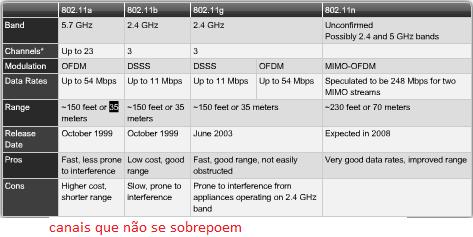
No escopo do CCNA serão abordadas as Spread Spectrum Wireless LANs, as redes Wi-fi (Wireless Fidelity). Abaixo são apresentados os padrões que existem hoje e suas características.
Padroes 802.11
Modos de Operação
Ad-hoc: dispositivo envia mensagens diretamente para o destinatário sem intermédio de um AP (Access-point).
Infraestrutura: dispositivo necessita do intermédio do AP para o destinatário receber a mensagem. Este modo suporta ainda dois: BSS (Basic Service Set) e ESS (Extended Service Set).
BSS: Utiliza apenas um ponto de acesso.
ESS: Utiliza dois ou mais pontos de acesso permitindo o roaming dinâmico entre a interseção das células de rádio (ex. rede celular). O ideal é de as células possuir um overlap (sobreposição) de 10 a 15%.
Service Sets
Transmissão sem-fio
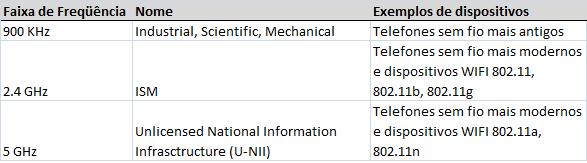
Órgãos de cada país regulam as freqüências disponíveis para uso. Algumas são liberadas de licença, mas outras não. Abaixo são apresentadas as freqüências relevantes liberadas, nome e exemplos de dispositivos, respectivamente.
Freqüências
Interferência
Para se medir a interferência é utilizado a medida SNR (Signal-to-Noise ratio).
No escopo do CCNA, os seguintes artefatos causam interferência de sinal:
Ondas de rádio na mesma freqüência.
Barreiras físicas, especialmente se possuir uma grande quantidade de metal que absorve parte do sinal.
Cobertura e Velocidade
A área de cobertura de um determinado AP, no escopo CCNA, depende de fatores como:
Potência do sinal;
Freqüência utilizada;
Interferência;
Proximidade a determinados materiais (ex: metal).
A força do sinal é proporcional a velocidade de transmissão de dados, ou seja, quanto mais forte (ex: mais próximo do AP) maior velocidade de transmissão. Para se aumentar a área de cobertura pode-se: utilizar antenas especiais, aumentar o número de antenas, aumentar o ganho na antena e aumentar a potência de transmissão.Olá Pessoal,
Segue um resumo feito por mim a respeito de Redes sem-fio (Wireless Networks) com o objetivo da Certificação.
Redes sem-fio
Básico
Como o padrão Ethernet (802.3) o Wireless (802.11) opera na camada 2 do modelo OSI.
Utilizam o algoritmo CSMA/CA (Carrier Sense Multiple Access / Colision Avoidance). Ou seja, ao contrário do modelo Ethernet que utiliza o CSMA/CD (Detection) o algoritmo das Wireless LANs tenta evitar a colisão de dados trabalhando preferencialmente em Half-duplex.
Tecnologias sem-fio
Infravermelho, banda estreita, banda larga, satélite, WIMAX.
No escopo do CCNA serão abordadas as Spread Spectrum Wireless LANs, as redes Wi-fi (Wireless Fidelity). Abaixo são apresentados os padrões que existem hoje e suas características.
Padroes 802.11
Modos de Operação
Ad-hoc: dispositivo envia mensagens diretamente para o destinatário sem intermédio de um AP (Access-point).
Infraestrutura: dispositivo necessita do intermédio do AP para o destinatário receber a mensagem. Este modo suporta ainda dois: BSS (Basic Service Set) e ESS (Extended Service Set).
BSS: Utiliza apenas um ponto de acesso.
ESS: Utiliza dois ou mais pontos de acesso permitindo o roaming dinâmico entre a interseção das células de rádio (ex. rede celular). O ideal é de as células possuir um overlap (sobreposição) de 10 a 15%.
Service Sets
Transmissão sem-fio
Órgãos de cada país regulam as freqüências disponíveis para uso. Algumas são liberadas de licença, mas outras não. Abaixo são apresentadas as freqüências relevantes liberadas, nome e exemplos de dispositivos, respectivamente.
Freqüências
Interferência
Para se medir a interferência é utilizado a medida SNR (Signal-to-Noise ratio).
No escopo do CCNA, os seguintes artefatos causam interferência de sinal:
Ondas de rádio na mesma freqüência.
Barreiras físicas, especialmente se possuir uma grande quantidade de metal que absorve parte do sinal.
Cobertura e Velocidade
A área de cobertura de um determinado AP, no escopo CCNA, depende de fatores como:
Potência do sinal;
Freqüência utilizada;
Interferência;
Proximidade a determinados materiais (ex: metal).
A força do sinal é proporcional a velocidade de transmissão de dados, ou seja, quanto mais forte (ex: mais próximo do AP) maior velocidade de transmissão. Para se aumentar a área de cobertura pode-se: utilizar antenas especiais, aumentar o número de antenas, aumentar o ganho na antena e aumentar a potência de transmissão.
Sejam bem-vindos ao novo website que em breve será reconhecido como referência para estudos da nova prova CCNA (640-802).
O objetivo do autor é de compartilhar todo o material de estudo utilizado para se preparar para a prova, apresentar um roteiro de estudos e estar apto a responder todas e quaisquer dúvidas.
O autor possui experiência de 2 anos no mundo de redes de computadores atuando na área de networking com Linux, mas não fugindo as configurações de equipamentos Cisco/Linksys.